



Last updated: October 2026
A Dun kin e Gift Card (also called a Dun kin eGift) is a convenient way to send someone the gift of Dun kin without mailing a physical card. Instead of waiting for a plastic gift card to arrive, you can send a digital gift card electronically through supported Dun kin channels.
Whether you’re looking for a last-minute birthday gift, want to treat a friend to coffee, or received an eGift and need to know how to use it, there are several important details to understand.
Dun kin offers gift cards through its website, mobile app, participating restaurants, and select retailers. Its digital gifting options allow eligible customers to send eGift cards electronically, including by email or text.
This guide explains how to buy, send, receive, use, register, reload, combine, and check the balance of a Dun kin eGift, as well as what to do when a card is lost, delayed, sent to the wrong person, or appears to have an incorrect balance.
What Is a Dun kin e Gift Card?
A Dun kin e Gift Card is a digital Dun kin gift card that stores monetary value for eligible Dun kin purchases.
Unlike a physical gift card, an eGift does not require a plastic card to be mailed to the recipient. Depending on the available gifting option, it can be delivered electronically.
Dun kin’s terms refer to the gifting functionality as an “eGift” or “mGift.” Supported delivery methods can include email and text message, with functionality varying by the Dun kin website or app.
A Dun kin eGift is particularly useful when you:
- Need a last-minute gift
- Want to send coffee to a friend
- Are shopping for a birthday
- Want to thank a coworker or employee
- Need a small holiday gift
- Do not want to ship a physical card
- Want to personalize a digital gift
Dun kin e Gift Card vs. Physical Gift Card
| Feature | Dun kin e Gift Card | Physical Dun kin Gift Card |
|---|---|---|
| Delivery | Digital | Physical |
| Email delivery | Yes, where offered | No |
| Text delivery | Yes, where offered | No |
| Physical card | No | Yes |
| Expiration | Does not expire | Does not expire |
| Ongoing service fee | None | None |
| Balance checking | Online, app, phone, or participating location | Online, app, phone, or participating location |
| Registration | Available for eligible cards | Available |
| Good for last-minute gifts | Yes | Less convenient |
| Can be lost physically | No | Yes |
Dun kin says its gift cards never expire or lose value and do not have service fees.
Dun kin e Gift Card vs. Virtual Dun kin Card
These terms can cause confusion.
A Dun kin e Gift Card is primarily associated with gifting. It is purchased and sent to another person, although a sender may also send one to themselves.
A virtual Dun kin Card refers to a Dun kin Card represented digitally rather than as a physical plastic card. Dun kin says cards purchased through the app are virtual cards and are usable within the app rather than being delivered as physical cards.
In other words, “eGift” describes the gifting function, while “virtual card” describes how a card can be represented and managed digitally. The way the card was purchased and whether it is enrolled can affect how it can be managed and used.
How to Buy a Dun kin e Gift Card
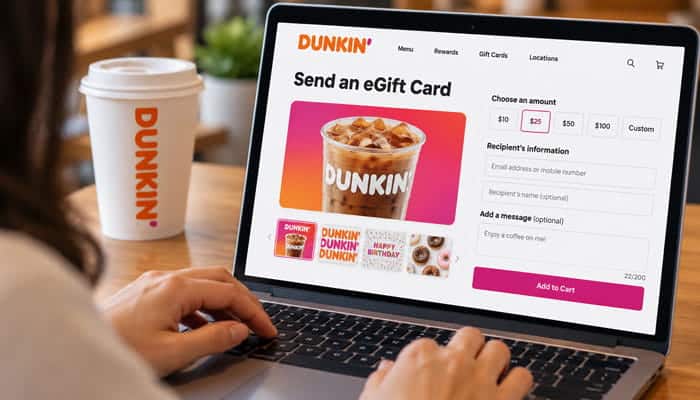
You can purchase Dun kin gift cards through Dun kin’s website and app, as well as at participating restaurants and select retail locations.
For an electronic gift, the website or app is generally the most convenient option.
How to Buy a Dun kin e Gift Card Online
The exact website interface can change, but the basic process is:
- Visit Dun kin’s official gift-card section.
- Select the digital gift or gifting option.
- Choose a gift-card design.
- Select the available amount.
- Enter the recipient’s information.
- Add a personal message if the option is available.
- Select the delivery method.
- Review all details.
- Complete payment.
- Save your confirmation.
Always verify the recipient’s information before submitting the purchase.
Dun kin’s terms place responsibility on the sender for providing accurate recipient information.
How to Buy a Dun kin e Gift Card in the App
Dun kin’s app supports gift-card functionality.
A typical process is:
- Open the Dun kin app.
- Sign in to your account.
- Open the gift-card or gifting section.
- Choose a design.
- Select an available amount.
- Enter the recipient’s email address or phone number.
- Add a message if desired.
- Review the order.
- Complete payment.
Dun kin’s official gift-card FAQ says eGift cards are available to eligible loyalty members through the app, with email or text delivery.
Because Dun kin periodically changes its app interface, the exact menu names may differ from older instructions.
Who Can Send a Dun kin e Gift Card?
Dun kin’s official information distinguishes between website gifting and app gifting.
Its gift-card FAQ says customers can purchase and send Dun kin gift cards as eGifts through the website, while app-based eGift functionality is available to eligible loyalty members.
Therefore, if you do not see an eGift option in the app, check whether you are signed into the correct Dun kin account and whether the current app supports the feature for your account.
How to Send a Dun kin e Gift Card
Sending an eGift generally involves four main pieces of information:
- Gift amount
- Recipient information
- Delivery method
- Optional personal message
Step 1: Choose a Design
Dun kin offers different gift-card designs and has also offered personalized cards.
Depending on the current selection, you may find designs for:
- Birthdays
- Holidays
- Thank-you gifts
- Celebrations
- General gifts
- Coffee lovers
Step 2: Choose the Amount
Select the amount offered during checkout.
Gift-card denominations and transaction restrictions can change, so use the current options shown by Dun kin rather than relying on old screenshots or third-party articles.
Step 3: Enter the Recipient Information
Enter the recipient’s email address or phone number.
Check this carefully.
A typo can cause the gift to be delivered to the wrong address or prevent the intended recipient from receiving it.
Step 4: Add a Message
Dun kin supports personalized messages for applicable gift-card transactions.
A short message can make the digital gift feel more personal than simply forwarding a card.
Step 5: Complete Payment
Review the recipient details and complete payment.
Step 6: Save Your Confirmation
Keep the order confirmation until the recipient confirms that the gift has arrived.
How Much Should You Put on a Dun kin eGift?
The appropriate amount depends on the occasion and how much you want to give. These are practical gifting examples rather than official Dun kin recommendations:
- $10–$15: A casual coffee gift or small thank-you
- $20–$25: A birthday, holiday, or appreciation gift
- $25–$50: A larger personal gift or gift for someone who regularly visits Dun kin
If you’re unsure, choose an amount that fits your budget and the occasion. The recipient can generally use the available balance toward eligible purchases rather than needing to spend it all at once.
Can You Send a Dun kin e Gift Card by Email?
Yes.
Email is one of Dun kin’s supported digital delivery methods for eGift cards.
It is a useful option when you:
- Know the recipient’s email address
- Want a simple digital gift
- Want to send the gift in advance
If the email does not arrive, check the recipient’s spam, junk, promotions, and filtered folders.
Can You Send a Dun kin e Gift Card by Text?
Yes, where the text-delivery option is available.
Text delivery is particularly convenient when you need to send a gift quickly.
However, Dun kin’s terms note that standard messaging rates may apply. International phone numbers can also be subject to international messaging charges.
What Happens if the Recipient Does Not Claim the Dun kin e Gift Card?
Dun kin’s terms describe reminder notifications for unclaimed gift cards. Under the applicable gifting functionality, a reminder can be sent to the sender after the gift remains unclaimed.
The terms also describe a process that allows the sender to redirect an unclaimed gift to a different email address or phone number before the recipient claims it.
This means you should not automatically assume that an undelivered or unclaimed eGift is permanently lost.
If the gift has not been claimed, check the gift-sent information and contact Dun kin support if necessary.
What If You Sent the Dun kin e Gift Card to the Wrong Email Address?
Contact Dun kin customer support as soon as possible.
Dun kin’s terms say the sender is responsible for providing the correct recipient information.
If the gift has not yet been claimed, the applicable gifting functionality may allow the sender to redirect it.
However, Dun kin states that a gift card generally cannot be returned or canceled after it has been received, and same-day delivery orders have additional restrictions.
Have your:
- Order number
- Purchase email
- Recipient information
- Purchase date
- Gift amount
ready when contacting support.
How Long Does a Dun kin e Gift Card Take to Arrive?
An eGift is designed for electronic delivery, so it is generally much faster than a physical card.
However, delivery time can depend on:
- Delivery method
- Order processing
- Email provider
- Phone carrier
- Whether the recipient’s information was entered correctly
- Whether the gift requires the recipient to claim it
If the recipient does not see the gift immediately, check spam and junk folders before purchasing another card.
How to Check a Dun kin e Gift Card Balance
There are several ways to check a Dun kin Card balance.
Method 1: Check Online
Go to Dun kin’s gift-card page and enter the requested card number and PIN.
Dun kin currently displays a balance-checking tool that accepts a card number and PIN.
If the card does not have a PIN, Dun kin instructs customers to check the balance at a Dun kin location.
Method 2: Check in the Dun kin App
If the card is registered:
- Open the Dun kin app.
- Sign in.
- Select Add/Manage Cards.
- Select the card.
- View the displayed balance.
Method 3: Check on Dun kin’s Website
Sign in to your Dun kin account and use the balance-management functionality.
The website provides a Check Balance and Funds option for registered cards.
Method 4: Check at a Dun kin Restaurant
You can ask a Dun kin crew member to check the balance.
Dun kin says no purchase is required to request a balance check in-store.
Method 5: Check by Phone
Dun kin provides 1-800-447-0013 for card and Rewards support.
Its FAQ directs customers to select the applicable balance option.
What Do You Need to Check a Dun kin Gift Card Balance?
For online balance checking, you generally need:
- Card number
- PIN
Physical Dun kin Cards normally display the card number and PIN on the back.
For an eGift, the relevant information may be contained in the digital gift message or associated with your Dun kin account.
Why Is My Dun kin Gift Card Balance Not Updating?
A recent transaction may not immediately appear in the displayed balance.
Dun kin recommends manually refreshing the balance.
In the Dun kin App
Go to Add/Manage Cards, select the card, and use the refresh option beside the balance.
On the Website
Go to Check Balance & Funds and refresh the displayed balance.
If the amount still looks incorrect:
- Compare it with your receipt.
- Confirm you are checking the correct card.
- Refresh again.
- Review your transaction history.
- Contact Dun kin support if the discrepancy continues.
Can You Use a Dun kin e Gift Card Without Registering It?
Yes.
Dun kin says registration is not required to use a Dun kin Card.
However, Dun kin encourages customers to register cards because registration can make it easier to protect the balance if a card is lost.
This is particularly important for physical cards and digital cards that are not otherwise protected through an account.
Why Should You Register a Dun kin Gift Card?
Registration provides several practical benefits.
It can make it easier to:
- Manage the card
- Check its balance
- Review transaction information
- Reload the card
- Set up auto-reload
- Combine balances
- Protect an eligible balance if the card is lost
Dun kin’s terms strongly encourage customers to register cards when they receive them.
What Happens if a Dun kin Gift Card Is Lost or Stolen?
An unregistered card should generally be treated like cash.
Dun kin’s current FAQ says that if a registered card is lost, customers can contact the company so the balance can be frozen and transferred to a replacement card.
The company’s terms also explain replacement protection for eligible registered cards.
This is one of the strongest reasons to register your card.
Can You Reload a Dun kin Gift Card?
Yes.
Eligible Dun kin Cards can be reloaded using accepted payment methods.
Dun kin says you can use:
- Cash
- Credit card
- Debit card
You cannot use one Dun kin Card to purchase or reload another Dun kin Card.
Does Dun kin Offer Auto-Reload?
Yes.
Dun kin provides auto-reload functionality for eligible cards.
Its FAQ describes two general approaches:
Auto-Reload by Schedule
The card is automatically reloaded according to the selected schedule.
Auto-Reload by Balance
The card is reloaded when the balance falls below the selected minimum.
This can be useful for customers who frequently use Dun kin and do not want to manually add funds.
Can You Combine Multiple Dun kin Gift Cards?
Yes.
Dun kin provides balance-merging functionality through the app and website.
In the Dun kin App
The general process is:
- Open Add/Manage Cards.
- Find My Additional Cards.
- Select the card you want to merge.
- Choose Merge Balance to Primary.
- Confirm.
On Dun kin’s Website
Use the Transfer Funds function to select:
- The card you’re transferring from
- The card receiving the balance
Review the transaction and confirm.
Dun kin says cards merged into another balance are unregistered and removed from the account after the transfer.
Example: Combining Small Dun kin Balances
Suppose you have three cards:
| Card | Balance |
|---|---|
| Card A | $4 |
| Card B | $6 |
| Card C | $10 |
| Total | $20 |
Instead of managing three separate cards, eligible balances can be merged into one primary card.
This can make future purchases and balance tracking easier.
Can You Get Cash Back From a Dun kin Gift Card?
Generally, no.
Dun kin states that gift-card balances cannot be redeemed for cash, check, or credit unless required by applicable law.
If you have a small remaining balance, the usual solution is to use it toward a future eligible purchase.
Can You Use a Dun kin Gift Card for Online Orders?
This is one of the most important areas to explain carefully.
Dun kin’s current general gift-card page states that Dun kin gift cards cannot be redeemed for online orders.
However, Dun kin’s FAQ also contains information about enrolled Dun kin Cards being used as payment within its app, including for order-ahead functionality.
Because Dun kin’s official materials describe these situations differently, you should not assume that every Dun kin eGift automatically works for every online transaction.
The safest approach is:
- Register or add the eligible card to your Dun kin account if supported.
- Check the payment methods available for your specific order.
- If the card is accepted by the app, follow the app’s checkout instructions.
- If it is not accepted, use the card at a participating Dun kin restaurant.
This distinction is more accurate than simply saying either “Dun kin gift cards never work online” or “all Dun kin eGift cards work online.”
Can You Use a Dun kin e Gift Card in the Dun kin App?
Eligible enrolled Dun kin Cards can be added to the Dun kin app.
Dun kin’s FAQ says customers can add a Dun kin gift card through the app’s card-management area.
The company also says Dun kin Cards purchased directly through the app are virtual cards and are usable within the app.
The important distinction is that card type, enrollment status, and the specific transaction can affect available functionality.
Do Dun kin Gift Cards Earn Rewards Points?
The purchase or reload of a Dun kin Gift Card does not earn Dun kin Rewards points.
However, Dun kin says Rewards members can earn points when they make eligible purchases using an enrolled Dun kin Gift Card.
For example:
Buying a $25 gift card → no Rewards points for the gift-card purchase.
Using that enrolled card to buy an eligible Dun kin beverage → the eligible purchase can earn Rewards points.
The important distinction is between purchasing or reloading the gift card and using an enrolled card to pay for an eligible purchase.
Dun kin Gift Card vs. Dun kin Rewards
| Feature | Dun kin Gift Card | Dun kin Rewards |
|---|---|---|
| Stores monetary value | Yes | No |
| Used as payment | Yes, subject to applicable terms | No |
| Can be gifted | Yes | No |
| Requires account | Not always | Yes |
| Can expire | Dun kin says no | Points follow Rewards expiration rules |
| Earns points when purchased | No | N/A |
| Can earn points when used for eligible purchases | Yes, when enrolled | Yes |
| Can be reloaded | Yes, if eligible | N/A |
Dun kin’s current Rewards FAQ says Rewards points expire 12 months from the last day of the month in which they were earned.
That rule is separate from the gift-card balance, which Dun kin says does not expire.
How Many Dun kin Rewards Points Do You Earn With a Gift Card?
The payment method itself does not reduce the normal eligible Rewards earning rate.
Dun kin says members earn the same number of points regardless of whether they pay with cash, credit/debit, an enrolled Dun kin Gift Card, Apple Pay, or Google Pay.
The key requirement is that the purchase itself must qualify for Rewards.
Are Gift-Card Purchases Eligible for Dun kin Rewards?
No.
Dun kin specifically excludes the purchase or reload of Dun kin Gift Cards from Rewards point earning.
Other exclusions can also apply, including certain retail purchases, donations, and delivery-platform purchases.
Can You Use a Dun kin Gift Card Outside the United States?
Dun kin’s current general gift-card page says its cards are redeemable at participating Dun kin restaurants in the United States.
Therefore, do not assume that a U.S. Dun kin gift card will work at a Dun kin location in another country.
If you’re buying a gift for someone outside the United States, verify the applicable country’s gift-card options before purchasing.
Can You Use a Dun kin Gift Card at Every Dun kin Location?
Dun kin says gift cards are redeemable at participating U.S. Dun kin restaurants.
The word participating is important.
If you’re visiting a location where you’re unsure whether the card is accepted, confirm before placing the order.
What If a Dun kin Gift Card Is Already Used?
If you receive a gift card and discover that some or all of the balance has already been spent, contact Dun kin customer support.
Do not post the card number or PIN online.
Keep:
- The original eGift message
- Purchase confirmation
- Transaction information
- Approximate purchase date
- Card number, if available
Dun kin can then determine what assistance is available.
What If My Dun kin eGift Never Arrives?
Use this troubleshooting checklist:
1. Verify the Recipient Information
Make sure the email address or phone number is correct.
2. Check Spam and Junk Folders
Search for messages from Dun kin.
3. Search the Inbox
Try searching for “Dun kin,” “gift card,” or “eGift.”
4. Check the Order Confirmation
Confirm that the payment was completed.
5. Check the Gift-Sent Information
If the gifting system provides a sent-gift section, review the status.
6. Contact Dun kin Support
Provide your order number and purchase email.
Is a Dun kin e Gift Card Safe?
Buying directly through Dun kin’s official website or app is generally the safest approach.
The bigger risk comes from unauthorized sellers.
Dun kin says cards may not be resold without authorization and reserves the right to deactivate or reject cards associated with unauthorized sellers or fraudulent activity.
Common Dun kin Gift Card Scams
Watch for offers that:
- Sell gift cards at unusually deep discounts
- Ask you to pay with gift cards
- Request your gift-card PIN
- Promise a “free” Dun kin gift card after paying a fee
- Ask for your Dun kin password
- Send suspicious links
- Come from unverified social-media accounts
- Pressure you to provide the card code immediately
A legitimate gift-card transaction should not require you to give a stranger your card credentials.
Dun kin e Gift Card Pros and Cons
Pros
- Fast digital delivery
- Convenient for last-minute gifts
- Email delivery
- Text delivery where supported
- No physical card required
- No expiration
- No service fee
- Personalized gifting options
- Account management for registered cards
- Balance merging
- Reload functionality
- Auto-reload options
Cons
- Incorrect recipient information can cause problems
- Unregistered cards have weaker loss protection
- Unauthorized sellers can create fraud risks
- Gift cards cannot purchase other gift cards
- Cash redemption is generally unavailable
- Some app features depend on card type and enrollment
Dun kin e Gift Card vs. Other Payment Methods
| Payment Method | Stores Money | Can Be Gifted | Can Be Used for Eligible Dun kin Purchases | Can Earn Rewards on Eligible Purchases |
|---|---|---|---|---|
| Dun kin e Gift Card | Yes | Yes | Yes, subject to card terms | Yes when enrolled |
| Physical Dun kin Gift Card | Yes | Yes | Yes, subject to card terms | Yes when enrolled |
| Credit/Debit Card | No | No | Yes | Yes |
| Apple Pay/Google Pay | No | No | Yes where accepted | Yes |
| Dun kin Rewards | No | No | No, not a payment method | N/A |
Common Dun kin e Gift Card Mistakes
- Sending the card to the wrong email address or phone number.
- Not registering an eligible card for easier management and lost-card protection.
- Assuming every card supports the same features.
- Expecting Rewards points for gift-card purchases or reloads.
- Sharing the card number or PIN with others.
- Buying discounted cards from unverified sellers.
- Trying to buy or reload another Dun kin Card with a gift card.
Best Practices for Buying a Dun kin e Gift Card
For the smoothest experience:
- Buy from Dun kin or an authorized retailer.
- Double-check the recipient’s information.
- Save the order confirmation.
- Register the card when eligible.
- Keep the card number and PIN private.
- Check the balance after significant transactions.
- Use Dun kin’s official app or website for account management.
- Contact support quickly if the gift is sent incorrectly.
- Keep gift-card information separate from Rewards information.
Dun kin e Gift Card FAQs
1. What is a Dun kin e Gift Card?
A Dun kin e Gift Card is a digital gift card that can be sent by email or, where available, text message.
2. Does a Dun kin e Gift Card expire?
No. Dun kin gift cards do not expire or charge service fees for maintaining a balance.
3. How do I check my Dun kin e Gift Card balance?
Check your balance on Dun kin’s website using your card number and PIN, through your registered account, at a participating restaurant, or by calling 1-800-447-0013.
4. Can I use a Dun kin e Gift Card without registering it?
Yes. Registration is optional, but it provides account management and eligible lost-card protection.
5. Can I reload a Dun kin e Gift Card?
Eligible cards can be reloaded using accepted payment methods. You cannot use a Dun kin gift card to reload another Dun kin card.
6. Can I combine multiple Dun kin gift cards?
Yes. Eligible card balances can be merged through Dun kin’s app or website.
7. Do I earn Rewards points when buying a Dun kin e Gift Card?
No. Gift-card purchases and reloads do not earn points. Eligible purchases paid for with an enrolled Dun kin gift card can earn points.
8. What should I do if my Dun kin e Gift Card does not arrive?
Verify the recipient’s details, check spam or junk folders, and review your order confirmation. Contact Dun kin support if the gift still has not arrived.
Final Thoughts
A Dun kin e Gift Card is one of the easiest ways to send a Dun kin gift digitally. It eliminates the need to mail a physical card and can be delivered through supported electronic channels such as email or text.
The most important things to remember are that Dun kin gift cards do not expire, have no service fees, can be checked online or through the app, can be reloaded when eligible, and can be combined through supported account functionality.
Registration is also worth considering because it makes card management easier and can provide protection for eligible lost cards.
The biggest point to verify before using a Dun kin eGift is where and how the card can be redeemed. Dun kin’s current general gift-card page and its app-related FAQ contain different wording about online use, so customers should rely on the current payment options displayed by Dun kin rather than assuming every digital card works for every online transaction.
For the safest experience, buy from an official or authorized source, carefully check the recipient’s information, save your confirmation, keep your card number and PIN private, and contact Dun kin promptly if a gift is missing, misdirected, or appears to have unauthorized activity.
