


Last Updated: June 18, 2026
Connecting Moz Pro to Google Analytics can improve SEO reporting by combining search visibility data with website traffic, engagement and conversion information. However, authorizing any third-party platform to access analytics data raises an important question: Is Moz Connect to Google Analytics Safe Private, or could the integration expose sensitive website and business information?
For most ordinary websites, the official Moz and Google Analytics connection can be reasonably safe when it is initiated through Moz, authorized through Google OAuth and configured with limited permissions.
However, the connection should not be considered completely private. After authorization, Moz may retrieve and process the Google Analytics information permitted by the approved OAuth scope and the effective permissions of the connected Google user.
The actual privacy risk depends on:
- The OAuth permissions requested by Moz
- The GA4 accounts and properties accessible to the connected user
- The user’s effective GA4 role
- Cost and revenue restrictions
- The information collected in GA4
- Moz’s data-processing and retention practices
- Your organization’s account-security controls
This guide explains how the connection works, what information Moz may be able to access, how GA4 permissions affect exposure and how to connect or disconnect the integration safely.
Quick Answer: Is Moz Connect to Google Analytics Safe Private?
Connecting Moz to Google Analytics is generally a manageable security risk for ordinary blogs, ecommerce stores and business websites when proper safeguards are used.
The official connection should use Google OAuth, which allows Google to authenticate your account without sharing your password with Moz. However, authorized Analytics data may still be transferred to and processed by Moz.
When evaluating “Is Moz Connect to Google Analytics Safe Private”, review the live Google consent screen, audit GA4 for personal information and use a dedicated Google identity with limited property-level access.
Healthcare, financial, legal, educational, government and other privacy-sensitive organizations should complete a formal vendor, security and legal review before connecting.
Should You Connect Moz to Google Analytics?
For most small businesses, bloggers, ecommerce stores, and SEO professionals, connecting Moz to Google Analytics can provide valuable reporting benefits with a manageable level of risk when configured properly.
A connection may be reasonable when:
- You need combined SEO and traffic reporting.
- The GA4 property does not contain personal information.
- The connected Google account has limited permissions.
- Multi-factor authentication is enabled.
- Access reviews are performed regularly.
Organizations handling regulated, confidential, or highly sensitive information should complete additional security and privacy reviews before connecting third-party services.
Key Takeaways
- Google OAuth should be used instead of password sharing.
- Review the current permissions shown on Google’s consent screen.
- OAuth scopes and GA4 user roles are separate access controls.
- Selecting one property in Moz may not technically restrict the token to that property.
- Restrict cost, revenue and personal information where appropriate.
- Revoking access stops future requests but may not delete information already imported into Moz.
Moz and Google Analytics Risk Summary
| Scenario | Risk Level |
|---|---|
| Personal Blog | Low |
| Small Business Website | Low to Moderate |
| Ecommerce Store | Moderate |
| Marketing Agency | Moderate to High |
| Membership Website | Moderate to High |
| Educational Institution | High |
| Financial Services Website | High |
| Legal Services Website | High |
| Healthcare Website | Very High |
| GA4 Property Containing PII | Critical |
Why Do Website Owners Connect Moz and Google Analytics?
Most users connect the platforms because they want to understand whether SEO improvements generate measurable business results.
Combining data may help answer questions such as:
- Which pages generate organic traffic?
- Which rankings produce conversions?
- Which landing pages underperform?
- Which content updates improve engagement?
- Which SEO activities contribute to revenue?
This business context helps explain why the integration exists in the first place.
What Does Connecting Moz to Google Analytics Mean?
Moz Pro and Google Analytics provide different types of website data. Understanding this difference helps answer the question, “Is Moz Connect to Google Analytics Safe Private”
Moz primarily focuses on SEO performance and may provide information such as:
- Keyword rankings and search visibility
- Technical crawl issues
- Page optimization recommendations
- Backlinks and domain metrics
- Competitor and search-performance trends
Google Analytics 4 focuses on visitor activity after users reach a website or app. Its reports may include:
- Users, sessions and engaged sessions
- Landing pages and page views
- Traffic sources and channels
- Events and key events
- Ecommerce activity and revenue metrics
Connecting the platforms allows selected GA4 information to appear alongside Moz campaign data. This can help website owners determine whether ranking improvements increase organic traffic, which landing pages perform best and whether SEO work contributes to engagement, leads or sales.
The connection is mainly a reporting integration. It does not automatically install a new Analytics tag, change your website code or transfer ownership of your GA4 property to Moz.
Therefore, when asking “Is Moz Connect to Google Analytics Safe Private”, remember that the integration combines reporting data, while the actual privacy level depends on the permissions approved and the information available to the connected Google account.
How Does the Moz and Google Analytics Connection Work?
The exact menu names may change, but the connection generally works like this:
- Sign in to Moz Pro and open or create a campaign.
- Select the option to connect Google Analytics.
- Moz redirects you to Google’s authorization page.
- Choose the Google account that can access the required GA4 property.
- Review the application identity and requested permissions.
- Approve or reject the connection.
- Google issues an authorization token that Moz uses to retrieve permitted Analytics data.
Relevant GA4 information can then appear inside the Moz campaign.
The token is an authorization credential rather than your Google password. It may remain active until it expires, is revoked or requires renewed authorization.
When considering “Is Moz Connect to Google Analytics Safe Private”, the most important step is to review the current permission request before approving the connection.
What Is Google OAuth?
OAuth 2.0 is an authorization system that allows one service to access limited information from another service without receiving the user’s main password.
When Moz connects to Google Analytics:
- Google verifies your identity.
- You review and approve the requested access.
- Moz receives an authorization token instead of your password.
- The token works only within the approved scope.
- You can revoke the connection through your Google Account.
OAuth is safer than entering Google credentials directly into a third-party platform because your password is not shared. However, it does not make the connection completely private. An authorized application may still retrieve and process information covered by the approved permission.
When asking “Is Moz Connect to Google Analytics Safe Private”, check that the application is genuine, review the requested scope and understand how the authorized data may be used and retained.
Does Moz Receive Your Google Password?
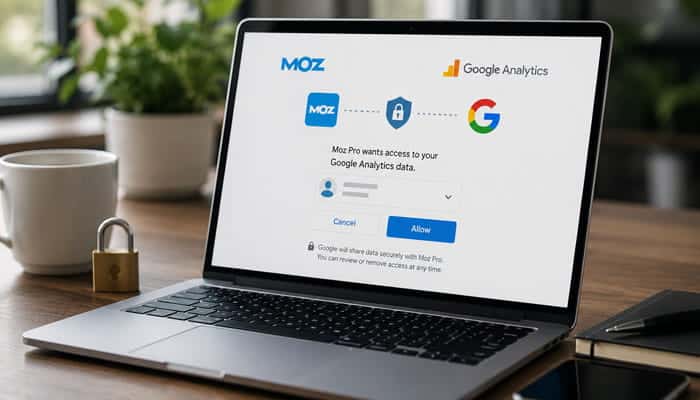
Moz should not receive your Google password when you connect through the official Google OAuth process. Google handles authentication and gives Moz an authorization token instead of sharing your password.
Enter your credentials only on a genuine Google sign-in page. Stop immediately if a Moz-branded form, unofficial SEO tool, group-buy service, reseller or unknown browser extension asks for your Google password.
Phishing pages may closely imitate Google or Moz. Check the website domain, application identity and requested permissions before signing in or approving access.
When evaluating “Is Moz Connect to Google Analytics Safe Private”, confirming that Google handles the login is one of the most important security checks.
The Short Version
If you only remember one thing from this guide, remember this:
Security Risk
Generally manageable when using the official integration.
Privacy Risk
Depends on what information exists inside GA4.
Biggest Mistake
Authorizing access using an account-level Administrator.
Safest Setup
A dedicated property-level Google account with Viewer access and MFA enabled.
Is Connecting Moz to Google Analytics Safe and Private?
For most blogs, business websites and ecommerce stores, the official connection can be reasonably safe when:
- Google handles authentication.
- The application and requested permissions are verified.
- The connected account has limited GA4 access.
- GA4 contains no prohibited personal information.
- Financial metrics are restricted when unnecessary.
- Strong passwords and multi-factor authentication are enabled.
- Third-party access is reviewed regularly.
When asking “Is Moz Connect to Google Analytics Safe Private”, remember that the integration is not completely private because authorized Analytics information may be transferred to and processed by Moz.
The official Moz and Google Analytics connection can be reasonably secure, but its privacy depends on the permissions granted, the information stored in GA4 and the security controls used by the account owner.
Possible Google Scopes Are Not Necessarily Moz’s Actual Permissions
Google provides OAuth scopes across several Analytics APIs, including current and legacy categories. These permissions may allow applications to view reports, manage Analytics settings, review user permissions or perform certain administrative actions.
However, the availability of these scopes does not mean Moz requests or uses all of them. When evaluating “Is Moz Connect to Google Analytics Safe Private”, rely on the live Google consent screen rather than a general list of available Google permissions.
Review whether Moz is requesting:
- Read-only access to Analytics data
- Management or editing access
- User or account administration
- Access to unrelated Google services
Pause the connection if the screen unexpectedly requests Gmail, Drive, Calendar, Contacts, Photos or broad Analytics administration.
The consent screen is the most reliable place to confirm Moz’s current permissions. Therefore, the answer to “Is Moz Connect to Google Analytics Safe Private” depends partly on whether the requested scope matches the reporting purpose and avoids unnecessary access.
OAuth Scope and GA4 Role Are Different
Two separate controls affect the practical access available to an integration.
1. The Connected User’s GA4 Role
The GA4 role determines which Analytics accounts, properties, settings and reports the signed-in Google user can access.
2. The OAuth Scope Granted to Moz
The OAuth scope determines the type of Analytics information or action Moz is authorized to request.
Practical access depends on both controls.
A broad OAuth scope does not automatically grant access to a property that the connected Google user cannot open. However, authorizing an integration through an account-level Administrator may create substantially more exposure than using a dedicated identity with limited property-level access.
GA4 Roles Explained
Google Analytics 4 provides five roles at the account or property level.
| GA4 role | Main access | Reporting suitability |
|---|---|---|
| Viewer | Views reports, settings and available data | Lowest-risk option |
| Analyst | Creates and shares explorations | More than basic viewing |
| Marketer | Manages events, audiences and attribution | Broader reporting access |
| Editor | Controls most property settings | High privilege |
| Administrator | Manages settings, users and permissions | Highest privilege |
A Viewer role is the safest starting point when Moz supports it. If a higher role is required, use a dedicated property-level account and reduce its permissions after setup where possible.
When considering “Is Moz Connect to Google Analytics Safe Private”, review both directly assigned and inherited roles because they determine the user’s effective access.
Account-Level vs Property-Level Access
GA4 permissions can be inherited.
A user with Administrator or Editor access at the Analytics account level may inherit that role across every property in the account.
Assigning a lower role at one property may not reduce access when the same user already has a more powerful account-level permission.
Before connecting Moz:
- Check whether the user has account-level access.
- Review inherited roles.
- Remove unnecessary permissions.
- Avoid using an organization-wide Administrator.
- Use a dedicated property-level identity where practical.
- Confirm the user’s effective permissions.
Property-level access is generally safer because it reduces the number of websites and datasets accessible through the connected identity.
Does Moz Get Access to Every GA4 Property?
Potentially, Moz’s OAuth authorization may cover Analytics properties available to the connected Google user, depending on the approved scope and Moz’s implementation.
Selecting one GA4 property for a campaign does not necessarily prove that the authorization token is technically restricted to only that property. For better privacy, use a dedicated company-controlled Google identity that can access only the required Google Analytics 4 property.
This is especially important for agencies, consultants and businesses managing multiple websites or client accounts.
Before connecting, verify:
- GA4 account and property name
- Property ID and website domain
- Web data stream
- Effective user role
When evaluating “Is Moz Connect to Google Analytics Safe Private”, limiting the connected account to one required property is safer than authorizing an identity with broad account-level access.
Restricting Cost and Revenue Information
GA4 provides two financial-data restrictions:
- No Cost Metrics: Hides advertising costs, cost per click, cost per key event and return on ad spend.
- No Revenue Metrics: Hides ecommerce, product, advertising, subscription and refund revenue.
These restrictions are useful when an employee, contractor, agency or reporting tool needs traffic and engagement data but does not require confidential financial information.
A restricted user may still view organic sessions, landing pages, traffic sources and engagement metrics. When asking “Is Moz Connect to Google Analytics Safe Private”, limiting unnecessary cost and revenue access can reduce business-data exposure.
Test the user’s effective permissions because inherited roles may override restrictions. Therefore, the answer to “Is Moz Connect to Google Analytics Safe Private” also depends on whether financial-data controls work correctly for the connected account.
What Google Analytics Data Could Moz Access?
The data available to Moz depends on the approved OAuth scope, the connected user’s GA4 permissions, accessible properties, financial-data restrictions and Moz’s integration design.
Potentially accessible information may include:
- Users, sessions and engaged sessions
- Landing pages, page paths and page views
- Organic traffic and campaign sources
- Engagement rate, bounce rate and event totals
- Device, traffic and campaign sources
- Engagement rate, bounce rate and event totals
- Device, browser and approximate location data
- Ecommerce, revenue and custom metrics
Moz may display only selected metrics in its dashboard. When asking “Is Moz Connect to Google Analytics Safe Private”, review the approved permissions rather than judging access only by the reports visible in Moz.
The answer to “Is Moz Connect to Google Analytics Safe Private” also depends on the connected account’s effective role and whether sensitive financial or custom data is available in GA4.
Can Moz See Sensitive Customer Information?
In a properly configured GA4 property, direct personal identifiers such as customer names, email addresses, and payment-card details should never be collected.
If such information appears in Analytics because of implementation mistakes, any authorized integration could potentially process data that should not have been present.
This is why auditing GA4 before connecting third-party tools is one of the most important privacy controls.
Could Moz See Customer Names or Email Addresses?
A properly configured GA4 property should not contain directly identifying information such as:
- Customer names or personal email addresses
- Telephone numbers or postal addresses
- Government identification or payment-card details
- Medical or other sensitive records
Google prohibits users from sending information it can recognize as personally identifiable information to Analytics. However, tracking errors may accidentally collect personal data through URLs, page titles, form events, search terms or custom dimensions.
The Moz integration does not create these tracking mistakes, but it may process information already stored in GA4. Therefore, when asking “Is Moz Connect to Google Analytics Safe Private”, audit your Analytics property before authorizing access.
The answer to “Is Moz Connect to Google Analytics Safe Private” depends partly on whether GA4 contains personal information that should never have been collected.
How to Audit GA4 for Personal Information
Review the following areas before granting third-party access:
- Page-location values
- Page titles
- Event names
- Event parameters
- Custom dimensions
- Custom metrics
- User-ID implementation
- Site-search terms
- Form-tracking events
- Ecommerce parameters
- DebugView activity
- BigQuery exports, when applicable
Check whether URLs contain query parameters such as:
email=name=phone=address=customer=account=
Remove, redact or prevent identifying values from reaching Analytics.
Do not rely on a general assumption that GA4 contains no personal information. Examine the actual implementation and collected values.
PII and Personal Data Are Not Identical
Google’s definition of personally identifiable information may be narrower than legal definitions of personal data or personal information.
Information that does not directly display a person’s name may still be regulated under privacy laws.
Examples can include:
- Cookie identifiers
- Device identifiers
- Online identifiers
- User IDs
- IP-related information
- Location information
- Browsing activity
- Behavioral profiles
- Unique combinations of characteristics
Therefore, complying with Google’s prohibition on PII does not automatically demonstrate compliance with the GDPR, UK GDPR, CCPA, CPRA or every other privacy law.
Website owners remain responsible for determining what they collect, why it is collected and which legal obligations apply.
The Most Common Misunderstanding
Many users assume that a secure connection automatically means a private connection.
That is not necessarily true.
Security
Focuses on preventing unauthorized access.
Privacy
Focuses on how authorized information is collected, processed, stored, shared, and retained.
A platform can have strong security controls while still raising legitimate privacy questions.
Security and Privacy Are Different
A platform can use strong technical security while still raising legitimate privacy questions.
| Control | Security purpose | Privacy consideration |
|---|---|---|
| OAuth | Prevents direct password sharing | Still allows authorized data transfer |
| Encryption | Protects data during transmission or storage | Does not determine whether processing is necessary |
| Access controls | Restrict who can open an account | Do not automatically limit data retention |
| Multi-factor authentication | Reduces account-takeover risk | Does not restrict authorized processing |
| Token revocation | Stops future API requests | May not erase previously imported information |
| Audit records | Help investigate access | Do not replace privacy notices or agreements |
| Vendor agreements | Define security responsibilities | May also govern use, sharing and deletion |
Security asks:
Can an unauthorized person access the information?
Privacy asks:
What is collected, why is it processed, who receives it and how long is it retained?
A complete evaluation must address both questions.
What Moz’s Published Privacy Policy Says
Moz Group’s published privacy policy provides general information about how personal data may be processed. It should not be treated as a technical specification for the Google Analytics integration.
The policy discusses processing for purposes such as:
- Providing and improving services
- Operating websites and applications
- Communicating with users
- Maintaining security and meeting legal obligations
- Managing business operations
It also states that:
- Technical and organizational safeguards are used.
- Internet transmission cannot be guaranteed completely secure.
- Personal data may be disclosed to affiliates, processors, advisers and authorities where applicable.
- Personal data may be transferred internationally using appropriate safeguards.
- Retention may depend on legal, operational and business needs.
- Eligible individuals may have privacy rights.
The publicly available policy displays a last-updated date of September 29, 2021.
When evaluating “Is Moz Connect to Google Analytics Safe Private”, remember that this general policy does not confirm the exact technical details of Moz’s GA4 integration.
Because the policy is general and its visible update date is several years old, organizations should also review current:
- Customer and product terms
- Data-processing agreements
- Security disclosures
- Subprocessor information
- Support documentation
The policy does not necessarily confirm:
- Moz’s current Google OAuth scopes
- Every GA4 metric retrieved
- Whether all integration access is read-only
- Where imported reports are stored
- How long imported or backup data is retained
- How quickly disconnected campaign data is deleted
Therefore, the answer to “Is Moz Connect to Google Analytics Safe Private” cannot be based only on the general privacy policy.
Organizations that need a definite answer to “Is Moz Connect to Google Analytics Safe Private” should request written details from Moz about permissions, storage, retention and deletion.
Questions to Ask Moz Before Connecting Sensitive Data
A regulated or privacy-sensitive organization should ask:
- Which OAuth scopes does Moz currently request?
- Is the connection limited to read-only reporting?
- Which GA4 dimensions and metrics are retrieved?
- Does Moz receive aggregated or granular information?
- Where is imported information stored?
- Is it encrypted in transit and at rest?
- Which subprocessors may access it?
- How long is disconnected campaign data retained?
- Does deleting a campaign remove imported Analytics information and backups?
- Is a data-processing agreement available?
- Which international-transfer safeguards apply?
- Which current security certifications or assessments are available?
- How are customers notified about security incidents?
When evaluating “Is Moz Connect to Google Analytics Safe Private”, written answers about access, storage, retention and deletion are more dependable than assumptions based on general marketing language.
Advantages and Disadvantages at a Glance
Advantages
- Unified reporting
- Better SEO measurement
- Reduced manual reporting
- Improved stakeholder communication
- Faster performance analysis
Disadvantages
- Additional data sharing
- Third-party processing
- Potential financial-data exposure
- Vendor-management requirements
- Additional compliance considerations
Benefits of Connecting Moz and Google Analytics
Better SEO Performance Measurement
Moz can report rankings and search visibility, while GA4 shows what visitors do after reaching the website.
Together, the reports may help identify:
- Pages that rank but fail to engage visitors
- Search traffic that contributes to key events
- Content updates followed by higher traffic
- Technical improvements associated with increased activity
- Landing pages with strong traffic but weak conversions
- Organic pages contributing to leads or revenue
Less Manual Reporting
Without an integration, teams may repeatedly export spreadsheets, copy metrics and combine reports manually.
A direct connection may reduce repetitive reporting tasks.
Easier Stakeholder Communication
Clients and managers often care more about business outcomes than rankings alone.
Combined reporting can help connect SEO work with:
- Traffic
- Engagement
- Leads
- Sales
- Revenue
- Content performance
Centralized Monitoring
Reviewing related SEO and traffic information in one campaign can make changes easier to identify and investigate.
Main Privacy and Security Risks
Excessive Permissions
Approving more access than necessary may expose settings or information unrelated to basic reporting.
Highly Privileged Google Accounts
Using an account-level Administrator may create unnecessary exposure across multiple GA4 properties.
Incorrect Property Selection
Similar property names can cause users to connect the wrong brand, website or client.
Sensitive Financial Information
Ecommerce and advertising reports may contain revenue, pricing, refund and cost information.
Shared Moz Accounts
Shared logins weaken accountability and make access reviews more difficult.
Former Employee Access
Employees, contractors or agencies may retain access unless accounts are reviewed and removed.
Misconfigured GA4 Tracking
URLs, custom dimensions and event parameters may contain personal or confidential information.
Retained Copies
Information already imported into Moz may remain after Google authorization is removed.
Third-Party Processing
Infrastructure, monitoring, customer-support and cloud providers may participate in delivering the service.
Account Takeover
A compromised Moz or Google account could expose authorized reports and settings.
Risk Assessment by Website Type
The following levels are practical editorial estimates, not official risk classifications issued by Google or Moz. Actual risk depends on the property’s data, permissions, industry and legal obligations.
| Website or situation | Risk level | Recommended action |
|---|---|---|
| Personal blog with basic traffic data | Low | Review permissions and connect cautiously |
| Small-business website | Low to moderate | Use limited access, MFA and periodic reviews |
| Ecommerce store | Moderate | Restrict financial metrics when unnecessary |
| SEO agency managing clients | Moderate to high | Use dedicated property-level identities |
| Membership website | Moderate to high | Audit user IDs and custom events |
| Educational organization | High | Obtain administrative and privacy approval |
| Finance or insurance website | High | Complete a vendor-risk assessment |
| Legal-client portal | High | Keep privileged activity outside GA4 |
| Healthcare website | Very high | Obtain specialist compliance review |
| GA4 property containing PII | Very high | Correct collection before connecting |
| Shared group-buy Moz account | Critical | Do not connect |
| Unofficial authorization page | Critical | Stop and secure the Google account |
What Connecting Moz Does Not Automatically Do
Authorizing the Analytics integration does not automatically give Moz access to every Google service or allow it to modify your website.
The connection does not automatically:
- Access Gmail, Drive, Calendar or Contacts
- Install software on your device
- Change website code
- Add a new Analytics tag
- Add a visitor cookie
- Transfer ownership of the GA4 property
- Change Google rankings
- Submit pages for indexing
- Fix SEO problems
- Access Google Ads or Search Console
Access to another Google service would require a relevant permission or separate authorization.
Moz may also crawl publicly available website pages as part of its SEO tools. Public website crawling is different from accessing private Analytics reports.
Is Google Analytics Required to Use Moz Pro?
No. The Google Analytics integration is optional.
Without connecting GA4, you may still be able to use Moz features involving:
- Keyword research
- Rank tracking
- Website crawling
- Technical SEO
- Link analysis
- Domain metrics
- Page metrics
- Competitor research
- Search visibility
You may lose the convenience of viewing certain traffic metrics within a Moz campaign, but those metrics can still be reviewed directly in GA4.
Keeping Moz and GA4 separate may be appropriate for organizations with strict privacy or compliance requirements.
How to Connect Moz to Google Analytics Safely

Following these steps can help users asking “Is Moz Connect to Google Analytics Safe Private” reduce unnecessary access and protect their Analytics data.
Step 1: Audit the GA4 Property
Review URLs, event parameters, custom dimensions, form tracking, user IDs and ecommerce values for personal or confidential information.
Correct improper tracking before connecting another platform.
Step 2: Start From the Official Moz Website
Use the official Moz platform or a trusted bookmark.
Avoid group-buy services, cracked software, unknown resellers, unsolicited login links and lookalike domains.
Step 3: Use a Dedicated Google Identity
Where practical, use a company-controlled reporting identity rather than an employee’s personal Google account.
Limit that identity’s effective GA4 access to the required property.
Step 4: Apply the Lowest Supported Role
Begin with Viewer when supported by the current setup. Increase access only when there is a documented technical requirement.
Using limited permissions is important when evaluating “Is Moz Connect to Google Analytics Safe Private”
Step 5: Restrict Financial Information
Use No Cost Metrics or No Revenue Metrics when the connected platform does not require financial data.
Step 6: Review the Google Consent Screen
Confirm:
- The expected application is named.
- The correct Google account is selected.
- The permission relates to Analytics.
- The access matches the reporting purpose.
- No unrelated Google services appear.
- No unexpected management access is requested.
Step 7: Verify the Property
Check the account name, property ID, domain, data stream and business owner.
Step 8: Secure Both Accounts
Use unique passwords, a password manager, MFA, secure recovery methods and individual employee accounts.
Step 9: Document the Integration
Record:
- Approval date
- Approving person
- Connected property
- Business purpose
- Permissions displayed
- Data restrictions
- Connected Moz campaign
- Responsible owner
- Review date
Step 10: Reassess the Connection
Review the authorization when:
- An employee leaves
- A contractor’s work ends
- An agency relationship expires
- Moz requests reauthorization
- The requested permissions change
- GA4 tracking is expanded
- Sensitive information is introduced
- The Analytics account is reorganized
The answer to “Is Moz Connect to Google Analytics Safe Private” can change when permissions, users or the information collected in GA4 change.
Safe Connection Checklist
Before approving the connection, confirm that:
- The process begins on the official Moz website.
- Google handles account authentication.
- Every requested OAuth permission has been reviewed.
- A dedicated property-level identity is used where practical.
- GA4 has been audited for personal information.
- Financial metrics are restricted when unnecessary.
- MFA is enabled on both Google and Moz accounts.
- A date is recorded for reviewing or removing the connection.
Google Workspace Controls for Businesses
Google Workspace administrators can control which third-party applications are allowed to access organizational Google data.
Depending on the configuration, administrators may review information such as:
- Application name
- OAuth client ID
- Requested Google services
- Requested scopes
- Number of organizational users
- Verification status
- Privacy-policy information
- Support details
Depending on the Google Workspace configuration, administrators may classify or configure an application as Trusted, Limited, Specific Google data or Blocked.
This helps prevent employees from authorizing unapproved applications without organizational review.
Recommended Workspace Approval Process
- Locate the application in Google Admin’s app controls.
- Confirm its identity and OAuth client ID.
- Review every requested scope.
- Check the application’s verification status.
- Review current privacy and security documentation.
- Approve only the data access allowed by company policy.
- Record the decision and responsible administrator.
- Set a future review date.
- Revoke access when the business purpose ends.
Google verification is a useful trust signal, but it does not guarantee that an application can never experience a vulnerability or account compromise.
Privacy-First Setup for Agencies
Agencies face greater risk because employees may manage many client properties.
A safer setup is to:
- Obtain written client approval.
- Create a company-controlled integration identity.
- Give the identity access to one client property.
- Use the lowest role supported by the integration.
- Restrict financial information when appropriate.
- Enable MFA.
- Keep recovery details under company control.
- Prohibit password sharing.
- Document every connected campaign.
- Remove access when the client relationship ends.
Agency Access Model
| Setup | Privacy risk | Recommendation |
|---|---|---|
| Owner’s personal Google account | High | Avoid |
| One shared agency Google account | High | Avoid |
| Employee with account-wide access | Moderate to high | Restrict |
| Dedicated identity with one property | Low to moderate | Preferred |
| Dedicated identity with financial restrictions | Lower | Best for limited reporting |
Separate identities simplify employee offboarding, client separation and incident investigation.
Privacy and Legal Considerations
Connecting another service may add an additional organization to the data-processing chain.
Depending on the website, business and jurisdiction, review:
- Privacy-policy disclosures
- Cookie-consent settings
- Legal basis for analytics
- Data-processing agreements
- Vendor contracts
- International transfers
- Subprocessors
- Data-retention terms
- Consumer privacy rights
- Data-subject requests
- Deletion procedures
- Security obligations
- Incident-notification terms
A technically secure OAuth connection does not automatically satisfy every privacy law.
Legal requirements vary by location and industry. Obtain qualified advice when processing sensitive or regulated information.
GA4 Retention and Moz Retention Are Separate
Google Analytics provides retention settings for certain user-level and event-level information.
Standard GA4 properties generally allow applicable information to be retained for:
- Two months
- Fourteen months
Large standard properties may be limited to two months of event-level retention, while eligible Analytics 360 properties can offer longer retention options for certain event data.
The retention setting does not affect every standard aggregated report in the same way that it affects explorations and certain non-aggregated information.
More importantly, GA4 retention settings do not necessarily control data that has already been transferred to Moz.
There may be three separate retention periods:
| Data location | Retention controlled by |
|---|---|
| Original information in GA4 | Google settings and applicable terms |
| Information imported into Moz | Moz settings, policies and agreements |
| Reports downloaded by users | The organization storing those files |
Reducing the GA4 retention period does not demonstrate that an external copy has been erased.
Direct Integration vs Privacy-Focused Alternatives
A direct connection is convenient, but it is not the only way to analyze SEO performance.
| Reporting method | Convenience | Data exposure | Best use |
|---|---|---|---|
| Direct Moz–GA4 connection | High | Moderate | Routine reporting |
| Review GA4 separately | Moderate | Low | Privacy-sensitive websites |
| Export selected aggregated reports | Moderate | Low to moderate | Controlled client reporting |
| Privacy-filtered dashboard | High after setup | Depends on configuration | Larger teams |
| Monthly KPI summary | Low to moderate | Low | Executive reporting |
| No Analytics connection | Lower | Lowest | Regulated environments |
A company can use Moz for rankings, links and crawling while keeping visitor and conversion analysis inside GA4.
How to Disconnect Moz and Request Data Deletion
Removing Google authorization and deleting previously imported information are separate actions. This distinction matters when evaluating “Is Moz Connect to Google Analytics Safe Private”
To disconnect the integration:
- Open your Google Account.
- Go to Security or Third-party connections.
- Find the application associated with Moz.
- Review its access and choose Remove access.
- Open Moz Pro and disconnect the GA4 property from the relevant campaign.
- Check whether previously imported information remains.
Removing authorization should prevent future requests through that token, but it may not delete information Moz has already received.
Retention may depend on:
- Moz’s privacy policy and product settings
- Campaign or account deletion
- Data-processing agreements and contracts
- Backup schedules and legal obligations
When deletion is important:
- Disconnect the GA4 property and delete the relevant campaign where appropriate.
- Review account and privacy settings.
- Submit a deletion request to official Moz support.
- Request written confirmation and keep a record of the response.
When asking “Is Moz Connect to Google Analytics Safe Private”, do not assume that removing Google access automatically erases previously imported reports.
Why Moz and GA4 Numbers May Not Match
Differences between Moz and GA4 reports do not automatically indicate a security or privacy problem.
Possible causes include:
- Different date ranges or time zones
- Reporting and refresh delays
- Organic-traffic filters or channel definitions
- Consent Mode and cookie rejection
- Data thresholds or cardinality
- Incorrect GA4 property selection
- Financial-data restrictions
- Different metric definitions
Before investigating, compare the same GA4 property, dates, time zone, traffic segment, filters and metric definitions.
When evaluating “Is Moz Connect to Google Analytics Safe Private”, remember that reporting discrepancies usually relate to settings or processing differences rather than unauthorized access.
Common Connection Problems
Connection errors do not always indicate that the integration is unsafe. However, troubleshooting them is important when evaluating “Is Moz Connect to Google Analytics Safe Private”
The GA4 Property Does Not Appear
Possible causes include:
- The wrong Google account was selected.
- The user does not have access to the property.
- The property belongs to another Analytics account.
- Google Workspace blocked the application.
- Authorization needs to be refreshed.
- The property was recently created.
Open GA4 with the same Google identity and confirm that the property is available.
Google Says the Application Is Blocked
A Google Workspace administrator may have restricted third-party applications or sensitive OAuth scopes.
Do not bypass company policy by using a personal Google account. Ask the administrator to review the application and requested permissions.
Moz Shows Old or Missing Information
Possible explanations include:
- The authorization token expired or access was revoked.
- The wrong property is connected.
- Date ranges or time zones differ.
- GA4 processing or Moz reporting has not finished.
- Consent choices reduced data collection.
- The connected user’s permissions changed.
Confirm the Google account, GA4 property and reporting settings before reconnecting.
The Connection Suddenly Stops
Check whether:
- The authorizing user’s GA4 access or Google account was removed.
- A Workspace administrator blocked the application.
- The token became invalid.
- Moz requested reauthorization.
- A security event caused access to be revoked.
Review any new permission request carefully rather than approving it automatically. This helps answer “Is Moz Connect to Google Analytics Safe Private” based on the current access instead of an older authorization.
What to Do After Suspicious Authorization
If you used an unofficial page or approved unexpected permissions:
- Remove the application from your Google Account.
- Review recent security activity.
- Sign out unfamiliar sessions.
- Change your password if it was entered outside Google.
- Enable or reset MFA.
- Remove unfamiliar recovery methods.
- Review GA4 users and permissions.
- Check Workspace app activity where applicable.
- Review Moz users, campaigns and exports.
- Contact official Moz support.
- Document the incident.
- Investigate whether information was exported.
Changing the Google password alone may not invalidate every third-party authorization. Remove the application’s access directly.
Common Myths
Myth 1: OAuth Makes the Connection Completely Private
OAuth limits and controls authorization, but it does not prevent permitted data from being transferred.
Myth 2: Moz Automatically Gets Every Google Service
Gmail, Drive, Calendar and other Google services require relevant permissions or separate connections.
Myth 3: Selecting One Property Always Restricts the OAuth Token
Selecting a campaign property does not necessarily prove that the authorization is technically limited to that property.
Myth 4: GA4 Can Never Contain Personal Information
Tracking errors can send personal information through URLs, event parameters or custom dimensions.
Myth 5: Administrator Access Is Always Required
Routine reporting should use the lowest role supported by the current integration.
Myth 6: Connecting Moz Improves Google Rankings
The integration supports reporting and analysis. It is not a direct Google ranking factor.
Myth 7: A Verified Application Has No Risk
Application verification is useful, but it cannot guarantee that an account, vendor or integration will never experience a security incident.
Editorial Review Methodology
This guide was created using publicly available Google Analytics documentation, OAuth authorization principles, Google Workspace administrative controls, privacy-law concepts, cybersecurity best practices, and publicly available Moz product documentation.
Because permissions, OAuth scopes, privacy policies, and platform features can change over time, users should verify all permissions directly on the live Google consent screen before authorizing access.
Conclusion
So, is Moz Connect to Google Analytics safe private for website owners?
The official connection can be reasonably safe for ordinary SEO reporting when Google OAuth is used, the live permissions are reviewed, the connected account has limited GA4 access and both accounts are properly secured.
However, the integration is not completely private because authorized Analytics information may be transferred to and processed by Moz. The level of exposure depends on the approved OAuth scope, the user’s effective GA4 permissions, financial-data restrictions, the information collected in GA4 and Moz’s retention practices.
For ordinary blogs and business websites, the reporting benefits may outweigh the risks when appropriate security controls and regular access reviews are used. Agencies should use dedicated company-controlled identities, limit access to individual client properties and obtain client approval.
Healthcare, financial, legal, government and other regulated organizations should complete formal vendor, privacy and legal assessments before connecting sensitive Analytics properties.
Ultimately, the answer to “Is Moz Connect to Google Analytics Safe Private?” depends on reviewing the current consent screen, limiting access, securing both accounts and removing the integration when it is no longer required.
Is Moz Connect to Google Analytics Safe Private FAQs
1. Is Moz Connect to Google Analytics Safe Private for website owners?
Yes, the official connection is generally safe when Google OAuth is used, permissions are reviewed and GA4 access is limited. However, authorized Analytics data may still be processed by Moz.
2. Why do users search “Is Moz Connect to Google Analytics Safe Private” before connecting?
Users want to know what data Moz can access, whether their password is shared and how their Analytics information will be stored or processed.
3. Does Moz receive my Google password when I connect GA4?
No. Google authenticates your account and provides Moz with an authorization token instead of sharing your password.
4. Can Moz access every Google Analytics property in my account?
Access depends on the connected user’s GA4 permissions and the approved OAuth scope. A dedicated account with access to one property is the safer option.
5. Does “Is Moz Connect to Google Analytics Safe Private” depend on OAuth permissions?
Yes. Read-only reporting access presents less risk than permissions allowing account management, editing or user administration.
6. Can I prevent Moz from viewing revenue or advertising costs?
GA4’s No Revenue Metrics and No Cost Metrics restrictions can help limit access to financial information.
7. Does disconnecting Moz delete imported Analytics data?
Not necessarily. Disconnecting stops future access, but previously imported data may remain under Moz’s retention and deletion practices.
8. What is the final answer to “Is Moz Connect to Google Analytics Safe Private”?
The connection can be reasonably safe with limited permissions, secure accounts and regular access reviews, but it should not be considered completely private.
