


YouTube is one of the most popular video platforms, with millions of people watching and interacting with content daily. For every creator on YouTube, the comment section is more important as real conversations happen. It reveals what viewers think, what they enjoy, and what they want to see next. As engagement grows, tools like a YouTube Comment Finder become essential for managing and analyzing large volumes of audience feedback efficiently.
But as a channel grows, keeping track of all those comments can become overwhelming. Scrolling endlessly to find one specific comment or reply isn’t practical. That’s where a YouTube comment search tool comes in. It helps you quickly search for specific words, usernames, or discussions without wasting time.
In this blog, we’ll break down what a YouTube comment finder is, how it works, and why it can be useful for creators and brands alike.
What is a YouTube Comment Finder?
A YouTube comment finder is a specialized web tool that helps users or creators search, filter, and analyze comments on YouTube videos and shorts. By applying filters to targeted keywords, users can easily navigate the discussions and gain insights into the brand.
The YouTube comment finder helps fetch all comments from the specific given YouTube video URL and allows them to start searching by keywords, usernames, dates, and engagement metrics such as likes. It helps overcome YouTube’s lack of native search in comment sections and ensures that it gives insights more easily for creators, researchers, and viewers from the thousands of comments.
Most YouTube comment search tools allow users to access features without mandatory registration, and gain useful data from feedback, timestamps, and trends. It pulls public comments through YouTube’s API and shows matching comments within minutes without endlessly scrolling.
Why Creators and Brands Use Comment Finder Tools
A comment finder is not just about convenience. It serves strategic purposes:
- Save time from endless scrolling on videos
- Easily spots trends and common questions on videos
- Helps find targeted comments for analysis
- Available with free logins and tools.
How YouTube Comment Finders Work
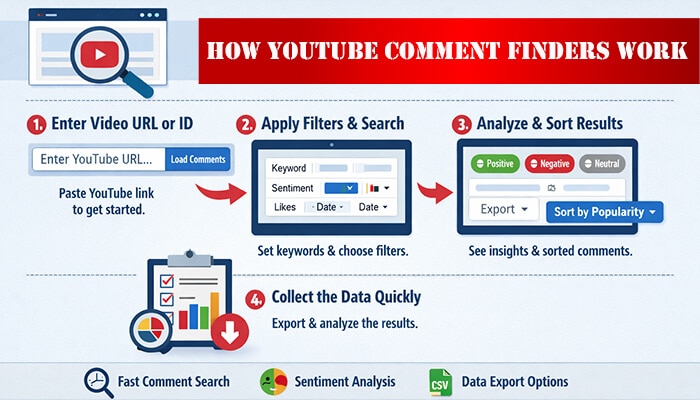
YouTube comment finder tools use the YouTube Data API to retrieve public comments based on YouTube comment search. On the search bar, the user can paste the video URL and wait for the tools to load comments in batches.
After typing the text for the search, the user can choose the filter to find the exact insights. AI tools analyze the comments and show tag sentiment analysis, export options, and popularity sort for advanced data analysis. Even if the video has millions of comments, these filters show results quickly.
Working Process
- Enter the YouTube video URL or ID.
- Open the tool, load the comments, and apply filters.
- Wait for the search engine to match the keywords in the comments
- After several sorts and filter applications, you can collect the data quickly.
How to Search for YouTube Comment
In the past, YouTube search was limited and had few tools to analyze public insights. However, now the tools like YouTube Comment Finder help to give results. Here is the step-by-step guidance on searching for insights on YouTube comments.
- Search out the official site of YouTube Comment Finder or install an app for use.
- Open the search bar and paste the YouTube video link or ID for analysis.
- Click search or load comments to start the work
- Wait a few seconds while the tool loads and analyzes the comments.
- Use filters such as “top,” “newest,” and “oldest” in a YouTube comment extractor for accurate data.
- Explore the results to CSV and click any comments to view on the YouTube channel.
How To Search For Keywords On YouTube Comments: Steps to Follow
To find specific keywords in YouTube comments, a user needs to utilize the filter options on the advanced website. To those who wondered how to search for keywords on YouTube comments, here is simple step-by-step guidance to search for keywords in YouTube comments.
- Open the comment finder tool.
- Enter the video URL
- Type the keywords in the search YouTube comment bar
- Press enter or find on the bar
- Wait for results that highlight comments with matches
- Specify your keywords with filters such as “>10 likes,” data range, or username for expected insights.
- After analyzing the data, export or copy the link for future reference.
- For a quicker and better search, use the “giveaway” features on the contest video.
How to See YouTube Comment History
Like every social platform, YouTube also holds up the history of watch lists, likes, and comments. Although YouTube restricts full access to comment history, some tools can help you learn how to search for YouTube comments and review comment history more efficiently. Below are a few simple tips for research and analysis.
- Use a popular comment finder app or tool.
- Then, paste the video URL.
- Select the “Oldest” sort in the comment filters.
- Scroll down to the top for the earliest comments.
- Tools like EMAPP easily help index the first comments publicly, but the earlier deleted comments are gone forever.
To learn how to see YouTube comment history, follow these steps.
- Open the YouTube app on your device.
- Select your profile picture and then YouTube Studio.
- Open YouTube Studio (desktop version) and click ‘Comments’ in the left menu.
- After finding it, apply filters based on video, date, or channel to see all your posts and replies.
- You can only view your own comment history unless you have access to another channel. You require special tools or channel permissions to analyze their history.
Best YouTube Comment Finder Tools
Finding the best YouTube comment finder tool may feel overwhelming. According to the user’s interest, speed, and features, here is the list of high-ranking tools.
1. YCF Comment Finder
YCF Comment Finder is a popular free web-based tool. The user does not require a login or ID registration. They can open the web and paste the YouTube video URL to load all public comments instantly. Search keywords, and add up filters by date, likes, or authors to give instant stats on total comments and timelines. They can go for live analysis or export to CSV for examination. Its instant loads and ad-free experience make it a perfect option for creators to identify trends or for viewers to find timestamps.
2. Hadzy
Hadzy tool ranks high for simple, ad-free analysis. The user can simply enter a video link to scan comments. They can utilize the word clouds, question finder, and popularity sorts to filter the targeted keyword stats. It is perfect for understanding the rising trends in content through feedback mining information. With its web-based access, users can search and pen out the targeted keywords and stats with unlimited use. Its user-friendly interface and speed analysis for long videos remain appreciated among users.
3. TubeBuddy
TubeBuddy is designed for professional creators who need built-in analytics. Its browser extension works with Chrome/Firefox/Edge and provides the results instantly. Users can enter comment filters by using keywords and bulk actions to track competitors’ sections. Its free plan offers limited features, while paid plans unlock advanced tools. It easily features reply templates, sentiment scores, and trends with SEO tools for better results.
4. CommentShark
CommentShark is a popular comment finder tool that excels in advanced moderation. Users can explore the free basic stage of the filter after signing up. It features sentiment analysis, a first/oldest comment finder, and random ID choices for giveaways. Users can utilize search keywords across replies to sort engagement metrics. With the clean dashboard, users can easily track data on large videos and export it if necessary. Web tool with a clean dashboard.
Pro: Tracks changes over time. Handles large videos fast. With AI tags, the creators can easily monitor the content reach.
5. YCF Firefox/Chrome Extension
YCF is a Chrome extension tool that delivers a one-click comment search for any video page. Along with likes and user data, with keyword analysis, users can understand their growth stats. It filters replies and transcripts separately for each video for data accuracy. It is a free YouTube finder tool that removes ads and other disturbances, and the Firefox version navigates Chrome through YCS for research. It is suitable for quick hunts and giveaway picks.
Free YouTube comment Finder
Here is the list of free YouTube comment finder platforms for user interest.
| Youtube Finder | Features |
| YCF |
|
| Hadzy |
|
| YCS Extension |
|
| CommentViewer.com |
|
Free versions may have usage limits depending on API quotas.
Manual Search vs YouTube Comment Finder Tool
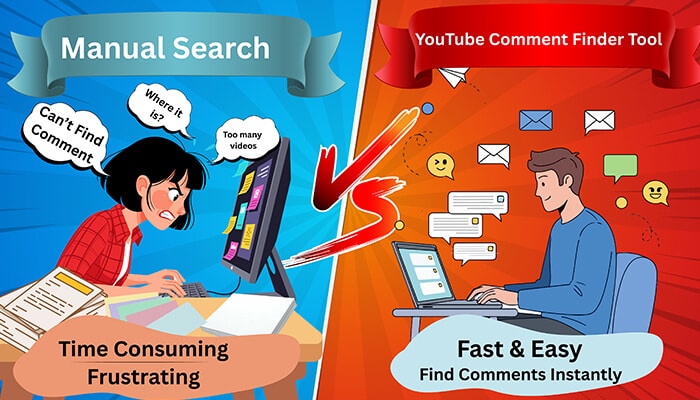
Here is the comparative study between the manual search and the YouTube comment search tool.
| Aspects | Manual Search | YouTube Comment Finder |
| Speed | Need to scroll thousands of comments | Get instant results |
| Keywords search | No access | Provides instant matches |
| Filter | Top and newest comments only | Offers stats on likes, dates, users and sentiment ranges |
| Export data | No | CSV or JSON |
| first/oldest | No, it shows only top comments | yes |
| Device Support | Web/Mobile | Web + Extensions |
| Cost | free | Mostly free |
| Best For | Short videos | Long videos, analysis |
| Limits | 100s shown | All public comments |
For videos with thousands of comments, automation significantly improves efficiency.
Are YouTube Comment Finder Tools Legal?
Most tools are legal if they:
- Access only publicly available comments
- Use the YouTube Data API properly
- Follow YouTube’s Terms of Service
Always verify that the tool complies with platform policies and does not request unnecessary account permissions.
Limitations of YouTube Comment Finders
- Cannot recover deleted comments
- Cannot access private videos
- Cannot retrieve restricted channel data
- API limits may restrict very large datasets
Understanding these limitations prevents unrealistic expectations.
Frequently Asked Questions
1. Can I find deleted comments?
No. A YouTube comment finder can access only comments that are available publicly. If a comment is deleted, it cannot be recovered through these tools.
2. Are YouTube comment finder web tools safe and legal?
Yes, most of the tools are safe to use when they collect data from public accounts. However, users should always follow YouTube’s Terms of Service while using any third-party tool.
3. Can YouTube comment finder help to analyze private channels?
No, most common finder tools are access support only for public channels. They do not support private accounts or restricted content.
Final Thoughts
A YouTube comment search tool simply makes life easier. So, now you know what is YouTube comment finder clearly. Instead of scrolling through hundreds or thousands of comments, you can locate it in seconds. It saves time and helps you stay on top of audience conversations.
With the right YouTube Comment Finder tool, you can quickly spot important feedback and use those insights to create better content. In an environment where engagement matters, efficient comment analysis is no longer optional—it is a competitive advantage.
