



Corruption in MS SQL database pages, indexes, keys, and stored procedures can occur at any time due to many reasons. To confirm and detect corruption in the MDF/NDF files, you can use the DBCC CHECKDB command. In this post, we’ll discuss the DBCC CHECKDB command and the steps to repair corrupt SQL database file using this command.
What is DBCC CHECKDB Command and How to Use it?
THE DBCC CHECKDB command can help you check and repair the logical and physical integrity of the pages, indexes, and other objects in the selected database. This command checks the consistency errors by performing the DBCC CHECKALLOC and DBCC CHECKCATALOG on the database, DBCC CHECKTABLE on each table and view within the database, validating the indexed view, and various other operations. Here’s is how to use this command:
DBCC CHECKDB(Databse1)
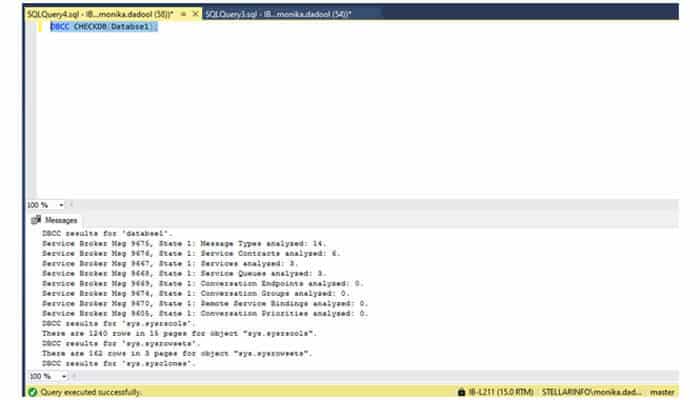
To check the physical consistency of the database, run the following command:
DBCC CHECKDB(databse1)WITHPHYSICAL_ONLY;
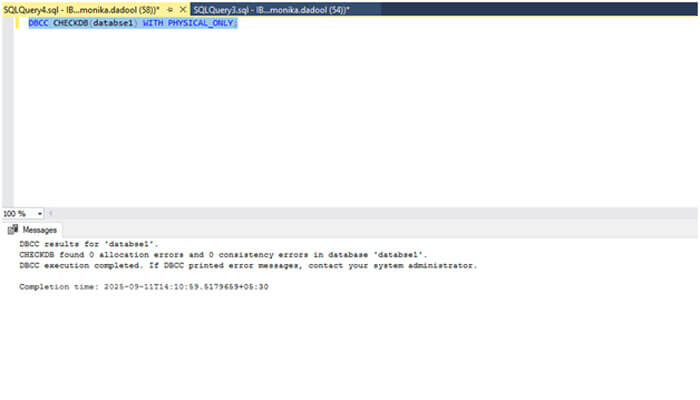
When you run the DBCC CHECKDB command, it will display a number of informational messages and error messages, which help you to understand the status and issues related to that database. If you’re encountering any of the common inconsistencies errors and issues in MS SQL database like errors 8944, 8928, 8976 etc., then you need to repair it.
Steps to use DBCC CHECKDB Command to Repair MS SQL Database
DBCC CHECKDB command can be used with different repair options. Before running any of the repair options, check the database-level permissions. Also, create a .bak file of the database. Next, follow the below steps to repair SQL database by using the DBCC CHECKDB command:
• First, you need to set the database to SINGLE_USER mode. You can run the following command to change the database state to single-user mode:
ALTER DATABASE Database1 SET SINGLE_USER
• Next, run DBCC CHECKDB command with the recommended repair option.
• If you just want to maintain syntax for backward compatibility, then run the command with the REPAIR_FAST option (see below):
DBCC CHECKDB ( ‘Databse1’, REPAIR_FAST)
• For repairing the minimum level corruption in database, you can use the REPAIR_REBUILD option, which commits the repair with no possibility of data loss.
DBCC CHECKDB ( ‘Databse1’, REPAIR_REBUILD)
Note: This option can help you resolve issues with non-clustered indexes, but does not support filestream data.
• If the SQL database is highly corrupted, then run the DBCC CHECKDB command with the REPAIR_ALLOW_DATA_LOSS option as given below.
DBCC CHECKDB ( ‘Databse1’ , REPAIR_ALLOW_DATA_LOSS) WITH ALL_ERRORMSGS, NO_INFOMSGS; GO
Note: It can help you repair severely corrupted database, but it might not always be the best option as it may deallocate data, such as rows, pages, or a series of pages, while resolving the issues. It leads to data loss.
When the database is repaired, set the database again to MULTI-USER mode. For this, run the below command:
ALTER DATABASE Database1 SET MULTI_USER
Alternative Solution: Try a Professional MS SQL Repair Tool
When the pages or other objects in MDF/NDF files are severely damage or corrupt, a professional MS SQL repair tool can help you. Stellar Repair for MSSQL is a professional tool with advanced repair algorithms that scans MDF/NDF files of any size or in any state to find and recover damaged objects. This repair tool also supports selective recovery and recovery of MS SQL Server ROW compressed data and PAGE compressed data. The tool can recover tables, collations, triggers, indexes, and other objects with complete integrity.
Highlighting Features of Stellar Repair for MSSQL
• Repairs NDF/MDF files created in any server version.
• Provides an option to select the database collation of a severely corrupted or damaged database file.
• Allows you to save the repaired database in a wide range of file formats, like CSV, HTML, XLS, and toa new database and live database.
• Provides an option to preview the repaired database before saving. From a preview window, you can even use find option to select specific items.
Conclusion
There are various reasons that can cause the inconsistency issues or corruption in SQL database. To check and repair the database, you can use the DBCC CHECKDB command. Depending on the severity of error and recommendation, you can run the repair option. If the database is severely corrupted, using the DBCC CHECKDB command with REPAIR_ALLOW_DATA_LOSS option can cause data loss. In this situation, you can rely on Stellar Repair for MS SQL to repair your database file. This purposefully designed tool can easily repair corrupt MDF files, recover all the data with 100 % accuracy, and complete integrity.
