

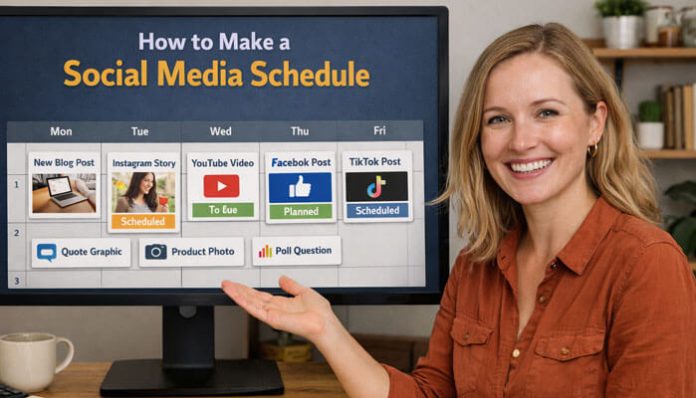

Creating content without a plan often leads to missed opportunities, inconsistent posting, and lower engagement. That is why learning how to make a social media schedule is one of the smartest things a business, creator, or marketing team can do.
A social media schedule is more than a list of post dates. It is a practical system that helps you organize what to post, where to post it, when it should go live, and what result each post should support.
When done well, a social media schedule saves time, improves consistency, supports better collaboration, and helps boost engagement. It also makes your content strategy easier to measure and improve. This guide shows exactly how to do it.
What Is a Social Media Schedule?
A social media schedule is a structured content plan for upcoming posts across your social platforms. It usually includes:
- publish date
- publish time
- platform
- content pillar
- post format
- topic or hook
- caption
- creative asset
- call to action
- goal
- KPI
- status or approval stage
The purpose is simple: instead of posting randomly, you publish with intention.
Why a Social Media Schedule Matters
A social media schedule helps you save time because you can batch tasks like ideation, writing, design, and scheduling into fewer focused sessions. It also improves consistency, which matters because regular publishing makes it easier to stay visible and build audience expectations over time.
It also supports better engagement. When your content is planned in advance, you are more likely to publish the right format on the right platform with a clearer goal and stronger call to action. That is one of the biggest benefits of learning How to make a social media schedule effectively.
How to Make a Social Media Schedule With Clear Goal
Before building your calendar, decide what you want your content to achieve.
Common goals include:
- brand awareness
- engagement
- website traffic
- lead generation
- sales
- customer education
- community building
Without goals, a schedule becomes a list of random posts. With goals, every post has a purpose.
A simple example:
- awareness content = short videos, broad tips, shareable posts
- engagement content = questions, carousels, polls, community prompts
- traffic content = blog promotion, link-based calls to action, lead magnets
- conversion content = demos, testimonials, offers, product posts
Know Your Audience Before You Build the Calendar
A schedule works best when it is built around audience behavior, not guesses. If you want to understand How to make a social media schedule effectively, audience research should come before content planning.
Ask:
- Who is your ideal audience?
- Which platforms do they use most?
- What kind of content do they respond to?
- What problems do they want solved?
- Do they want quick entertainment, educational help, or deeper expertise?
You can gather this information from:
- platform analytics
- comments and direct messages
- website FAQs
- customer support questions
- email replies
- social listening
- competitor engagement patterns
When you understand your audience first, your content becomes more relevant and more likely to perform well.
Audit Your Current Content Before Creating a New Schedule
If you already post on social media, review your existing performance before building a new calendar.
Review:
- top-performing posts
- weak posts
- best-performing formats
- best platforms
- strongest hooks
- posting times that worked well
- topics that drove saves, shares, clicks, or conversions
This helps you stop repeating weak content and build more of what already works.
Research Competitors to Find Content Gaps
Competitor analysis helps you understand what others in your niche are posting, how often they publish, and what gaps you can fill.
Look for:
- their most active platforms
- content formats that seem to perform well
- repeated topics
- promotional vs educational balance
- questions their audience asks in comments
Do not copy competitors. Use them to identify opportunities to be more useful, more consistent, or better positioned.
Optimize Your Profiles Before You Start Scheduling
This is one of the easiest things to overlook.
Before you start scheduling content, review:
- profile photo or brand image
- bio or description
- keyword clarity
- link in bio
- contact information
- pinned posts
- Story highlights
- visual branding consistency
A great schedule will not perform as well if the profile itself is unclear or weak. Your content brings people in, but your profile helps convert them into followers, leads, or customers.
Choose the Right Platforms for Your Social Media Schedule

You do not need to be on every platform. You need to be on the platforms that match your audience and content style, which is a key part of learning how to make a social media schedule effectively.
Instagram works well for Reels, carousels, Stories, and visual branding.
TikTok is strong for short-form video, trends, behind-the-scenes content, and quick educational clips.
LinkedIn is ideal for B2B content, case studies, founder-led posts, hiring, and professional education.
YouTube is useful for tutorials, explainers, long-form education, and Shorts.
Build 3 to 5 Content Pillars
Content pillars are your repeatable themes. They make scheduling much easier because you are rotating core topics rather than inventing a new strategy every day.
Common content pillars include:
- educational content
- behind-the-scenes content
- customer stories
- product or service promotion
- industry commentary
- FAQs
- community content
- founder insights
For example, a simple weekly mix might look like:
- Monday: educational tip
- Tuesday: behind the scenes
- Wednesday: customer story
- Thursday: promotional post
- Friday: engagement post
Decide How Often to Post
The best posting frequency is one you can maintain without sacrificing quality.
A practical starting point:
- Instagram: 3 to 5 posts per week
- TikTok: 3 to 7 posts per week
- LinkedIn: 2 to 5 posts per week
- YouTube: 1 long-form video weekly or biweekly, plus Shorts when possible
Consistency matters more than unrealistic volume.
Choose the Best Format for Your Social Media Schedule
A social media schedule can live in:
- a spreadsheet
- a project management board
- a scheduling platform
A spreadsheet works well for solo creators. A project board is useful for teams. A scheduling platform is best when you manage several accounts, approvals, and analytics in one place.
Your calendar should include at least:
- date
- time
- platform
- pillar
- format
- topic
- call to action
- goal
- KPI
- status
Use a Social Media Schedule Template
Here is a simple schedule template you can copy:
| Date | Platform | Content Pillar | Format | Topic/Hook | CTA | Goal | KPI | Status |
|---|---|---|---|---|---|---|---|---|
| Monday | Education | Carousel | 5 ways to save time with batching | Save this post | Engagement | Saves, shares | Scheduled | |
| Tuesday | TikTok | Behind the scenes | Short video | How we plan a week of content | Follow for more | Reach | Views, watch time | Draft |
| Wednesday | Thought leadership | Text post | Why random posting hurts consistency | Comment below | Engagement | Comments | Review | |
| Thursday | Promotion | Reel | Product or service demo | Visit link in bio | Traffic | Clicks | Scheduled | |
| Friday | Community | Image post | Customer success spotlight | Share this post | Trust | Shares, comments | Published |
Plan Around Campaigns and Key Dates
Your calendar should connect to bigger goals, not just daily activity. That is an important part of understanding how to make a social media schedule in a more strategic way.
Plan around:
- product launches
- seasonal campaigns
- blog posts
- webinars
- offers
- collaborations
- holidays
- events
- brand announcements
When you build monthly or quarterly themes first, weekly scheduling becomes much easier.
Batch Your Content to Save Time
Batching is one of the best ways to reduce content stress.
Try grouping tasks like this:
- brainstorm all ideas in one session
- write multiple captions in one session
- design all graphics in one session
- record several videos in one session
- schedule posts in one session
This reduces context-switching and helps maintain a stronger brand voice.
Repurpose One Piece of Content Across Multiple Platforms
Repurposing is a major time-saver. One blog post can become:
- an Instagram carousel
- a LinkedIn post
- a TikTok video
- a YouTube Short
- Story slides
- an email teaser
- a quote graphic
Do not copy and paste blindly. Adapt the format to the platform.
Define Team Roles and Create an SOP
If multiple people touch the content, define responsibilities clearly.
Typical ownership areas include:
- strategist or manager: goals, approval, reporting
- writer: hooks, captions, scripts
- designer or editor: visuals, video, templates
- publisher: scheduling and quality checks
- analyst: performance tracking
A simple SOP should outline:
- how ideas are submitted
- who drafts copy
- who designs assets
- who approves posts
- when deadlines happen
- how performance is reviewed
This keeps the schedule consistent and easier to scale.
Build an Approval Workflow
If you work with clients, teams, or stakeholders, use clear workflow stages such as:
- idea approved
- caption drafted
- asset complete
- review in progress
- final approval
- scheduled
- published
- performance reviewed
That reduces last-minute edits and missed deadlines.
Leave Space for Trend-Based and Reactive Content
A successful schedule should not be completely rigid.
A good rule is to keep most of your calendar planned, but leave some open slots for:
- breaking trends
- audience reactions
- quick updates
- community moments
- timely commentary
This is especially important on platforms where trends move fast.
Use Social Listening to Improve the Calendar
Social listening is still missing from many scheduling guides, but it is a valuable input.
Use social listening to find:
- recurring audience questions
- common complaints
- sentiment trends
- competitor mentions
- industry topics people care about
- language your audience actually uses
That makes your schedule more relevant because you are planning based on live market signals, not just assumptions.
Write Better Hooks, Captions, and CTAs
A schedule only works if the content itself is worth engaging with. A big part of learning how to make a social media schedule is making sure each post is built to attract attention and encourage action.
For each post, ask:
- What is the hook?
- What value does it give?
- What should the audience do next?
Useful calls to action include:
- save this post
- comment your opinion
- share this with a friend
- visit the link in bio
- read the full guide
- download the checklist
Make Your Content Accessible
Accessibility improves usability and content quality.
For social content, that means:
- add descriptive alt text where supported
- use clear subtitles or captions on videos
- avoid tiny text on graphics
- keep on-image text readable on mobile
- use strong contrast when designing visuals
This helps more people consume your content and supports better overall content quality.
Schedule Posts in Advance With the Right Tools
Use the tools that match your workflow:
- spreadsheets for simple planning
- project management tools for collaboration
- social media scheduling tools for publishing and reporting
The best system is the one your team can actually use consistently.
Prepare for Crises or Sensitive News
A professional content schedule should include pause rules.
Add a simple rule to your schedule process:
- pause scheduled posts during sensitive events or brand issues
- review whether content could appear tone-deaf
- escalate to an approver before publishing during major news moments
- keep one person responsible for pause decisions
This protects the brand and makes your publishing process more mature.
Set Governance and Access Controls
If you run brand accounts, decide who has access and what approvals are required.
Basic governance should cover:
- who can publish
- who can approve
- who can access passwords or tools
- how brand voice is documented
- how legal or sensitive posts are reviewed
This helps prevent errors and keeps the workflow secure.
Match KPIs to Your Goals
Measure success based on what the post is supposed to achieve.
If your goal is awareness, track:
- reach
- impressions
- follower growth
- video views
If your goal is engagement, track:
- comments
- shares
- saves
- engagement rate
If your goal is traffic, track:
- link clicks
- click-through rate
- landing page sessions
If your goal is conversions, track:
- leads
- sign-ups
- purchases
- conversion rate
Use Benchmark Times as a Starting Point, Then Customize
There is no universal best posting time. Start with broad benchmarks, but refine based on your own data.
Review:
- active audience hours
- reach by time slot
- engagement by day
- clicks by post time
- watch time for videos
Then improve the schedule monthly.
Review Performance Every Week
A good schedule is never static.
Review each week:
- best-performing posts
- weakest posts
- top formats
- strongest hooks
- best posting times
- platform performance
- audience questions and reactions
Then use that data to improve next week’s plan.
Common Mistakes to Avoid
Avoid these common problems:
- posting without a goal
- trying to be on every platform
- using the same content everywhere
- ignoring analytics
- overplanning with no flexibility
- skipping approvals
- forgetting accessibility
- not having a pause plan for crises
- focusing only on promotion
Final Thoughts on How to Make a Social Media Schedule
Learning how to make a social media schedule is really about building a repeatable system. It starts with goals, audience research, audits, competitor insights, and profile optimization. Then it moves into content pillars, batching, repurposing, scheduling, listening, accessibility, approvals, and measurement.
A strong schedule saves time because it reduces daily decision-making and helps you work in batches. It boosts engagement because your content becomes more consistent, more relevant, and better matched to each platform.
Most importantly, it gives your content strategy structure. Instead of posting randomly, you start publishing with purpose.
1. How do you keep a social media schedule manageable when you are short on time?
The easiest way to handle How to make a social media schedule with limited time is to batch similar tasks, reuse strong content ideas, and schedule posts at least a week in advance.
2. What is the easiest way to plan content for several social platforms at once?
Start with a few core content pillars and adapt each idea into platform-specific formats. This makes your posting plan easier to manage without creating everything from scratch.
3. Does a social media schedule look different for brands, freelancers, and creators?
Yes, How to make a social media schedule depends on your goals, audience, and resources. Brands may focus more on campaigns and conversions, while creators often prioritize consistency and engagement.
4. What usually goes wrong when people first build a content calendar?
A common mistake is posting just to stay active without connecting each post to a clear goal like reach, engagement, traffic, or leads.
5. Do you need expensive software to build an effective posting plan?
No, How to make a social media schedule can begin with a simple spreadsheet or free calendar tool. Paid platforms can help later, but they are not required at the start.
