
If you are wondering what are social media marketing tools, the simple answer is that they help turn social media from a manual, time-consuming task into a more organized marketing system. Instead of posting randomly and hoping for results, marketers can use these tools to stay consistent, save time, track performance, and improve decisions with real data.
For beginners, understanding what are social media marketing tools matters because these platforms make social media easier to manage and easier to measure. They are useful for small businesses, bloggers, ecommerce brands, agencies, freelancers, creators, local businesses, and B2B teams that want more structure and better results.
What Are Social Media Marketing Tools?
Social media marketing tools are apps or software platforms designed to help manage social media tasks more efficiently. Instead of logging into every platform one by one, marketers often use one dashboard to handle scheduling, publishing, content planning, replies, analytics, reporting, and sometimes even ad support.
A simple way to understand what are social media marketing tools is this: they help move social media from manual effort toward a repeatable workflow. A beginner may use them to schedule a week of posts. A business may use them to monitor engagement, reply to customers, measure traffic, and connect social performance to marketing goals.
Some tools are built directly into the social platforms themselves, while others are third-party platforms made to support multiple channels from one place.
Why Social Media Marketing Tools Matter in 2026
Social media is no longer just about posting updates. Brands now need to publish consistently, adapt content for different platforms, monitor engagement, respond quickly, study audience behavior, and connect social activity to business outcomes.
That is why social media marketing tools matter in 2026.
They help beginners reduce overwhelm. They help growing businesses save time. They help teams stay organized. Most importantly, they help marketers make decisions based on performance instead of guesswork.
In practical terms, these tools help with:
- saving time through scheduling and automation
- improving consistency across platforms
- reducing manual work
- centralizing social data
- improving reporting
- making content decisions with real feedback
- supporting collaboration and approvals
How Social Media Marketing Tools Work
Most social media marketing tools follow a similar workflow.
- First, you connect your social media accounts to the platform. Native tools work directly inside a specific social network, while third-party too ls connect several platforms into one dashboard.
- Second, you create or upload content. Some tools focus only on publishing, while others also include design features, caption generation, AI writing support, or content calendars.
- Third, you schedule or publish the content. This helps marketers plan ahead instead of posting manually every day.
- Fourth, the platform tracks performance. This shows which posts, campaigns, and formats are getting better results.
- Fifth, some tools also support engagement management and team approvals. That means marketers can monitor comments, messages, mentions, or internal review workflows from one place.
- Finally, you review the results and improve future content. This is where the real value appears. Good tools help you see what works, what underperforms, and what deserves more attention next.
Who Should Use Social Media Marketing Tools?
Social media marketing tools are useful for far more than large brands.
Small businesses
They can use these tools to schedule posts, stay active, and save time without hiring a large team.
Ecommerce brands
They can connect social activity with promotions, traffic, product visibility, and sales goals.
Bloggers and creators
They can use tools to plan content, maintain consistency, and track what attracts the most engagement.
Freelancers and consultants
They can build visibility without managing every task manually.
Agencies and larger teams
They can use social media marketing tools for approvals, reporting, collaboration, and multi-account workflows.
B2B companies
They can organize professional publishing, monitor engagement, and measure traffic or lead-focused performance more effectively.
Main Types of Social Media Marketing Tools
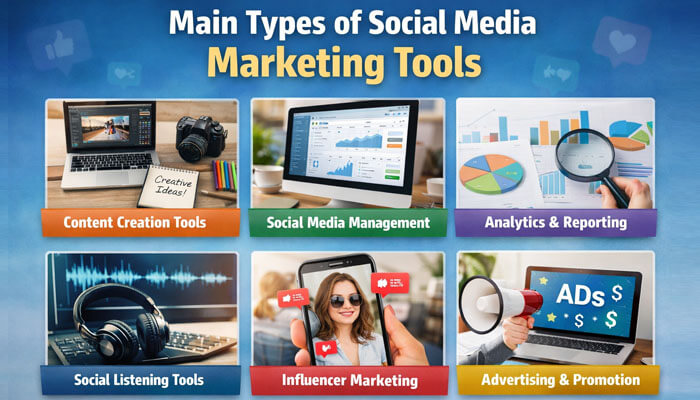
To better understand what are social media marketing tools, it helps to break them into categories.
1. Scheduling and Publishing Tools
These tools let you prepare posts in advance and publish them at the right time. They are especially useful for beginners because they make consistency easier.
Instead of posting manually each day, you can batch your content and keep your profiles active even when you are busy.
2. Analytics and Reporting Tools
Analytics tools help you measure performance. Without them, it is difficult to know whether your social media activity is creating engagement, traffic, leads, or conversions.
These tools help you move beyond vanity metrics and focus on results that support business goals.
3. Social Inbox and Engagement Tools
Some tools help manage comments, mentions, and messages from one place. This matters because social media is not only about publishing. It is also about conversations, customer care, and relationship building.
A faster and more organized response process can reduce missed opportunities and improve brand consistency.
4. Design and Content Creation Tools
Content creation tools help marketers develop captions, ideas, visuals, and post drafts more efficiently. In 2026, AI-assisted creation is now a major part of this category.
For beginners, this can make content production less intimidating and much faster.
5. Social Listening and Monitoring Tools
Social listening tools track mentions, trends, brand conversations, and topic signals. These tools are useful for reputation management, trend discovery, and content planning.
They help marketers understand what audiences are already discussing and where new opportunities may be emerging.
6. Advertising and Campaign Management Tools
Paid social media is also part of the tool ecosystem. These tools become more important when a brand wants to promote offers, products, lead magnets, or events beyond organic reach.
They help manage campaigns, improve targeting, and support broader marketing goals.
What Goals Can Social Media Marketing Tools Help You Achieve?
One of the best ways to understand what are social media marketing tools is to connect them to real goals.
These tools can support:
- brand awareness
- engagement
- website traffic
- lead generation
- customer support
- sales
- community growth
The right tool depends on the result you want.
If your main goal is consistency and visibility, scheduling tools may be enough. If your goal is traffic or conversions, analytics and campaign tracking become more important. If your goal is customer support or reputation, inbox and engagement workflows matter more.
Examples of Social Media Marketing Tools Beginners Should Know
Here is a simple table of beginner-friendly tools and their main use cases:
| Tool | Main Use | Best For |
|---|---|---|
| Meta Business Suite | Schedule posts, manage Facebook and Instagram, view insights | Beginners using Meta platforms |
| Google Analytics | Measure website traffic and campaign performance | Anyone tracking website results |
| Hootsuite | Scheduling, analytics, listening, AI, integrations | Businesses managing several channels |
| Sprout Social | Publishing, approvals, collaboration, analytics | Teams needing deeper workflow management |
| OwlyWriter AI | Caption ideas and AI-assisted drafting | Marketers who want faster content creation |
Free vs Paid Social Media Marketing Tools
This is one of the most common beginner questions.
Free tools usually offer:
- basic publishing
- limited account support
- simple analytics
- essential workflow features
Paid tools usually offer:
- more channels
- more users
- deeper reporting
- team approvals
- listening tools
- integrations
- stronger workflow controls
- AI-enhanced features
What Features Should a Good Social Media Marketing Tool Have?
When evaluating options, focus on the features that solve real workflow problems and help you understand what are social media marketing tools in a practical way.
A strong tool often includes:
- post scheduling
- content calendar
- analytics and reporting
- inbox or reply management
- multi-platform support
- integrations
- collaboration features
- approval workflows
- AI writing or ideation support
- ease of use
- clear pricing
For a beginner, the best tool is usually not the one with the biggest feature list. It is the one that is easiest to use and fits your current goals.
Key Features to Compare in Social Media Marketing Tools
Before choosing a tool, compare the following areas carefully:
| Feature | Why It Matters |
|---|---|
| Scheduling and publishing | Helps maintain consistency without daily manual posting |
| Analytics and reporting | Shows what is working and what needs improvement |
| Multi-platform support | Reduces the need to manage several apps separately |
| Inbox or reply management | Helps organize comments, messages, and mentions |
| Team collaboration | Useful for brands, agencies, and shared workflows |
| Approval workflows | Helps review content before publishing |
| Integrations | Connects social media data to other business tools |
| Social listening | Helps monitor trends, mentions, and brand conversations |
| AI support | Speeds up drafting, brainstorming, and routine tasks |
| Ease of use | Makes adoption simpler, especially for beginners |
| Pricing and upgrade path | Helps avoid overspending too early |
Best Social Media Marketing Tools by Use Case
Grouping tools by use case makes this topic easier for beginners.
| Use Case | Recommended Tools |
|---|---|
| Best for beginners | Meta Business Suite, Google Analytics |
| Best for small businesses | Meta Business Suite, Hootsuite |
| Best for agencies and larger teams | Sprout Social, Hootsuite |
| Best for AI-assisted content creation | OwlyWriter AI |
| Best for analytics and attribution | Google Analytics |
| Best for scheduling | Meta Business Suite, Hootsuite, Sprout Social |
| Best for approvals and team workflows | Sprout Social |
| Best for integrations | Hootsuite |
These recommendations depend on your channels, budget, and workflow needs.
Comparison Table: Popular Social Media Marketing Tools
| Tool | Best For | Free Option | Key Strength |
|---|---|---|---|
| Meta Business Suite | Facebook and Instagram management | Yes | Native scheduling, insights, ad support |
| Google Analytics | Website measurement | Yes | Traffic-source and campaign tracking |
| Hootsuite | Multi-platform management | Limited trial or paid focus | AI, listening, integrations |
| Sprout Social | Teams and approvals | Limited trial or paid focus | Approval workflows, collaboration |
| OwlyWriter AI | Faster content drafting | Inside Hootsuite ecosystem | AI ideas and captions |
Native Tools vs Third-Party Tools
A helpful distinction for beginners is native tools versus third-party tools.
Native tools are built directly into a platform.
Example: Meta Business Suite for Facebook and Instagram.
Third-party tools are built to support several platforms from one dashboard.
Examples: Hootsuite and Sprout Social.
This is one reason social media marketing tools are so useful for modern businesses, because they can simplify work across multiple channels.
Here is the key difference:
| Type | Strength | Best For |
|---|---|---|
| Native tools | Platform-specific management and direct insights | Beginners focused on one platform group |
| Third-party tools | Broader workflows, multi-channel support, integrations | Businesses managing multiple channels or teams |
Many businesses end up using both together.
AI in Social Media Marketing Tools in 2026
AI is now one of the biggest additions to this category.
In 2026, social media marketing tools can use AI to help with:
- caption drafting
- content idea generation
- repurposing existing content
- summarizing insights
- identifying trends
- speeding up repetitive work
This makes social media execution faster, but AI still needs human review. Brand voice, accuracy, relevance, and judgment still matter. AI can support the work, but it should not replace strategic thinking.
Team Collaboration, Approvals, and Workflow Management
As social media becomes more business-critical, workflow management matters more.
Approval systems help brands review content before it goes live. Collaboration tools help multiple people work together on planning, publishing, replying, and reporting.
This matters most for:
- agencies
- multi-person teams
- growing brands
- businesses in regulated industries
- brands with higher reputation risk
Approval workflows reduce posting mistakes, improve consistency, and create stronger quality control.
Why Integrations Matter in Social Media Marketing Tools
Integrations are one of the clearest differences between basic and advanced platforms. Strong social media marketing tools connect social workflows to other systems such as:
They connect social media workflows to other systems such as:
- CRM platforms
- reporting tools
- project management tools
- collaboration software
- broader marketing dashboards
Integrations matter because they reduce tool switching and connect social media performance to larger business operations. For businesses that want social activity tied more closely to sales, service, or campaign reporting, integrations become a serious decision factor.
How to Measure ROI With Social Media Marketing Tools
Analytics alone is not enough unless you connect activity to outcomes. That is where social media marketing tools become more valuable, especially when they help track performance beyond basic engagement.
That usually starts with:
- tagging campaign links
- checking traffic acquisition reports
- comparing campaign performance
- tracking conversions or lead actions
- separating engagement metrics from business metrics
This is a major lesson for beginners. Likes and comments may show attention, but they do not always prove business value. Traffic, leads, and conversions are what help measure real ROI.
Simple example
If a business publishes ten posts in a month and one campaign drives most of the website visits and lead form completions, that campaign is more valuable than a post that gets many likes but no meaningful actions. This is where tools become useful: they help reveal the difference between attention and business impact.
A Simple Social Media Tool Stack for Beginners
A practical beginner setup does not need five paid platforms. In most cases, a simple stack works better.
A beginner-friendly stack often includes:
- one native publishing tool for your main platform, such as Meta Business Suite
- one measurement tool, such as Google Analytics
- one optional cross-platform tool later, such as Hootsuite or Sprout Social
- one AI or drafting tool if content ideation is slow
This setup keeps costs lower and helps beginners learn without unnecessary complexity.
What Social Media Marketing Tools Cannot Do
This is important to understand.
Social media marketing tools are helpful, but they are not magic.
They cannot:
- replace strategy
- fully understand your audience without your input
- automatically create a clear brand voice
- fix a weak offer
- guarantee engagement or sales
- replace strong creative judgment
AI can speed up work, but it still needs human review for quality, context, and accuracy. The best results happen when tools support a smart strategy instead of trying to replace it.
How to Choose the Right Social Media Marketing Tool

Start by asking what you need right now.
A solo creator may only need scheduling and basic analytics. A local business may need simple publishing and traffic tracking. A growing team may need approvals, integrations, AI support, or deeper reporting. That is why social media marketing tools should be chosen based on workflow, not hype.
That is why choosing based on workflow matters more than choosing based on hype.
When comparing tools, check:
- platform compatibility
- ease of use
- reporting depth
- collaboration features
- integrations
- cost compared with time saved
How to Choose the Right Social Media Marketing Tool Step by Step
Follow this process:
- Define your goal.
- Choose your main platform or platforms.
- Decide whether you need only publishing or also analytics, approvals, integrations, or ROI tracking.
- Start with a free or native tool when possible.
- Test ease of use before upgrading.
- Add paid tools only when the added features solve a real problem.
- Review your results regularly and adjust over time.
This approach helps beginners avoid overspending and keeps the tool stack aligned with real needs.
Best Beginner Setup in 2026
A practical beginner setup often looks like this:
| Need | Suggested Tool |
|---|---|
| Facebook and Instagram scheduling | Meta Business Suite |
| Social traffic tracking | Google Analytics |
| Faster drafting and caption ideas | OwlyWriter AI or similar AI support |
| Broader dashboard later | Hootsuite or Sprout Social |
This setup works because it balances native publishing, real measurement, and optional scaling. Beginners do not need an enterprise platform on day one. They need a setup that helps them publish, learn, and improve.
Common Mistakes Beginners Make
Many beginners make the same avoidable mistakes when choosing social media marketing tools.
1. Expecting the tool to create success automatically
A tool can improve efficiency, but it cannot replace strategy, audience research, or strong content.
2. Choosing too many features too early
A complex platform is not always better. For many beginners, it only adds cost and confusion.
3. Tracking only vanity metrics
Follower counts and likes may look good, but they do not always connect to business outcomes.
4. Ignoring workflow fit
A tool should match your actual process. If it is too complicated to use consistently, it is probably the wrong fit.
5. Upgrading too fast
Many beginners pay for advanced features before they truly need them. It is better to grow into your tool stack over time.
Final Thoughts
So, what are social media marketing tools? They are the software platforms that help businesses and creators manage publishing, content planning, analytics, engagement, AI-assisted creation, approvals, integrations, and reporting more effectively. In 2026, these tools are no longer just optional extras for advanced marketing teams. They are practical working tools for anyone who wants social media to be more organized, measurable, and efficient.
For beginners, the smartest path is to start simple. Native options such as Meta Business Suite and Google Analytics are often enough to begin learning. Broader platforms like Hootsuite or Sprout Social become more useful when your workflow grows, your reporting needs deepen, or your team expands. AI can help speed up drafting and content planning, but human review still matters. The biggest lesson is this: tools support strategy, but they do not replace strategy. Clear goals, strong content, audience understanding, and regular measurement are still what drive results.
Frequently Asked Questions (FAQs)
1. What are social media marketing tools used for?
Social media marketing tools are used for planning content, scheduling posts, managing engagement, measuring analytics, monitoring conversations, supporting AI-assisted drafting, and improving campaign performance.
2. Are social media marketing tools only for large businesses?
No. Many social media marketing tools are useful for beginners, freelancers, creators, and small businesses. Free and native tools are often enough to get started.
3. What is the difference between social media platforms and social media marketing tools?
Social media platforms are networks like Facebook, Instagram, LinkedIn, and TikTok. Social media marketing tools are the software platforms used to manage, optimize, and measure activity across those networks.
4. Which social media marketing tool is best for beginners?
There is no single best option for everyone, but beginners often do well starting with Meta Business Suite for publishing and Google Analytics for measuring website traffic and campaign outcomes.
5. Do I need Google Analytics for social media marketing?
If your goal includes website traffic, leads, or conversions, Google Analytics is very useful because it helps show which social campaigns and tagged links actually drive results.