


Last Updated: August 18, 2026
Searching for an 8tshare6a Software Download creates an unusual problem. Instead of finding one clearly documented software product with a developer page, version history, verified installer and consistent specifications, searchers encounter several very different descriptions of what 8tshare6a supposedly is.
Some websites describe it as a file-management and media-conversion program. Others present it as a secure file-sharing application, cloud-sync platform, productivity suite or AI-powered transfer tool. Still other pages treat 8tshare6a as a website that recommends software rather than as one downloadable application.
That inconsistency matters because downloading software is not just about finding a button labeled Download. You need to know what the application actually is, who publishes it, what file you should expect, whether the installer is digitally signed, what permissions it needs and whether its security and privacy claims can be verified.
The current 8tshare6a.com website is active. Its own official-information page describes 8tshare6a.com as an “Independent Publication & Information Resource” managed by an editorial team and identifies Trevian Kelthorne as founder.
At the same time, the website publishes articles discussing “8tshare6a software,” including a page titled 8tshare6a Software Download. That page, however, mainly evaluates and recommends file-sharing services rather than functioning like a conventional desktop-software download page.
So, is an 8tshare6a Software Download safe and legitimate in 2026?
The answer requires more caution than a simple yes or no.
Quick Answer: Is 8tshare6a Software Download Safe?
There is currently not enough consistent public product documentation to give every file advertised as an 8tshare6a Software Download a blanket “safe” rating.
8tshare6a.com exists and publishes content using the name, but its official-information page describes the operation primarily as an information resource. Its current download article discusses services such as Google Drive, WeTransfer, Dropbox and OneDrive instead of presenting a conventional installer page with clearly documented binaries, versions, hashes and release notes.
Third-party websites go further and claim Windows, macOS and Linux compatibility, cloud storage, media conversion, installer sizes, pricing plans and encryption features. Some even describe a Version 2.5 roadmap. Those details should be treated as reported claims unless they can be matched to clear first-party product documentation.
Do not run an unfamiliar 8tshare6a installer until you can verify the developer, source, digital signature, file hash, version and expected behavior of that exact file.
Key Takeaways
- 8tshare6a.com is an active website in 2026.
- Its official-information page describes it as an independent publication and information resource.
- The site has a page called 8tshare6a Software Download, but the page primarily discusses file-sharing alternatives.
- Third-party descriptions disagree about what 8tshare6a actually does.
- Reported system requirements, pricing, installer sizes and cloud-storage limits should not automatically be treated as official specifications.
- The site’s Privacy Policy mainly addresses website activity rather than clearly documenting a downloadable application’s telemetry, cloud-file handling or device data.
- A third-party article predicted Version 2.5 for Q2 2026, but this review did not establish matching first-party release notes confirming that roadmap.
- Do not disable antivirus or operating-system security protections simply because an unknown installer or guide tells you to.


Website Identity vs Software Identity
One of the easiest mistakes when researching 8tshare6a Software Download is treating three separate questions as though they were the same.
| Question | What It Actually Establishes |
|---|---|
| Does 8tshare6a.com exist? | A website using the name exists |
| Does it publish articles about 8tshare6a software? | Software-related content appears on the domain |
Is a particular .exe, .msi, .pkg or .dmg authentic? |
Requires installer-level verification |
The first two questions can be answered by examining the website.
The third requires a different evidence chain:
developer identity → exact product → version → official distribution source → digital signature → checksum → release history
A website using the same name as an executable does not automatically authenticate that executable.
Why Does the 8tshare6a Download Page Discuss Other Tools?
This is one of the most important search-intent issues surrounding the keyword.
The page title suggests one intent:
Intent A: Download a Specific 8tshare6a Application
A visitor believes 8tshare6a is one particular program and wants the Windows, macOS or Linux installer.
But the body of the current page serves a different intent:
Intent B: Find File-Sharing Software Recommended by 8tshare6a
The article discusses how to choose file-sharing services and recommends established third-party tools.
Those intents are not identical.
A responsible guide should therefore avoid interpreting every search for 8tshare6a Software Download as proof that one clearly documented executable exists for everyone to install.
Are the Encryption Claims Verified?
Terms such as AES-256, end-to-end encryption and quantum-resistant encryption appear in descriptions linked to 8tshare6a or ShareMate 2022.
However, those phrases alone do not prove that a specific application provides strong encryption.
A proper security review would need to establish
- what data is encrypted
- whether encryption happens before upload
- whether transfers are encrypted
- whether stored data is encrypted
- who controls the encryption keys
- whether the provider can decrypt files
- whether metadata is protected
- what cryptographic protocols are used
- whether independent security testing exists
The ShareMate 2022 article makes encryption and quantum-resistance claims, but marketing-style descriptions are not the same as independently reviewed security documentation.
Therefore, an 8tshare6a Software Download should not automatically be considered secure simply because a page uses advanced encryption terminology.
How to Evaluate an 8tshare6a Software Download Safely
If you find a file advertised as 8tshare6a software, evaluate the specific installer, not just its name.
1. Verify the Download Source
Confirm where the installer came from.
Be cautious with
- shortened links
- advertising redirects
- unknown mirrors
- random file hosts
- copied download pages
- forum attachments
- installation pop-ups
Whenever possible, use a clearly identified and trusted developer source.
2. Identify the Publisher
On Windows, inspect the file properties and look for
- company name
- product name
- version
- file description
- copyright information
- digital-signature details
Ask whether the publisher shown by the installer matches the expected developer.
If it does not, investigate before running the file.
3. Check the Digital Signature
A digital signature can help identify who signed the software and whether the signed file has been modified.
On Windows
- Right-click the installer
- Select Properties
- Open Digital Signatures
- Select the signer
- Review the certificate
- Confirm the signature is valid
- Compare the signer with the expected developer
A valid signature improves confidence in the file’s origin, but it does not guarantee complete safety.
4. Calculate the SHA-256 Hash
A SHA-256 hash acts as a file fingerprint.
Use Windows PowerShell
Get-FileHash "C:\path\to\installer.exe" -Algorithm SHA256
Compare the result with a checksum published by the legitimate developer.
Downloaded file → developer checksum
If the values differ, the files are not identical.
A matching hash proves file identity, not that the software itself is harmless.
5. Search VirusTotal by Hash
VirusTotal can search existing reports using hashes such as SHA-256.
Searching by hash may let you review previous security results without uploading the executable again.
Treat the result as one security signal rather than a final verdict.
6. Scan the Installer Locally
Before opening unfamiliar software
- update your security software
- scan the installer
- keep real-time protection enabled
- investigate credible detections
- do not assume every warning is a false positive
No antivirus product can guarantee detection of every new threat.
7. Do Not Disable Antivirus Just to Install It
At least one third-party 8tshare6a guide recommends disabling real-time protection if installation is blocked.
That is not a good default approach for unverified software.
A warning could indicate
- low application reputation
- unwanted software
- suspicious behavior
- a false positive
- malicious code
Investigate the warning before bypassing security protections.
8. Review Requested Permissions
Permissions should match what the program claims to do.
Be cautious if a basic file utility asks for
- browser credentials
- password-manager access
- accessibility permissions
- persistent administrator privileges
- firewall exceptions
- unexplained startup services
- broad access to sensitive folders
The key question is whether the requested access is reasonable for the software’s purpose.
9. Inspect Installation Options
Watch for bundled extras such as
- browser extensions
- toolbars
- homepage changes
- unrelated utilities
- additional security software
- cryptocurrency programs
- system cleaners
Use Custom or Advanced installation when available.
10. Check the Update Mechanism
A trustworthy application should explain how updates are delivered.
Check whether
- updates come from a known source
- update files are signed
- a changelog exists
- version numbers are documented
- security fixes are listed
- automatic updates can be controlled
An undocumented updater adds another layer of uncertainty to an 8tshare6a Software Download.
Safe 8tshare6a Software Download Checklist
| Check | Better Sign | Warning Sign |
|---|---|---|
| Download source | Official developer source | Random mirror or file host |
| Product identity | Consistent naming | Conflicting product names |
| Publisher | Verified publisher | Unknown or unrelated |
| Digital signature | Valid expected signer | Missing or invalid |
| Version | Clearly documented | No version information |
| SHA-256 | Matching developer checksum | No reference checksum |
| Antivirus | No credible detections | Multiple detections |
| Permissions | Match stated purpose | Excessive access |
| Installer | Clean and transparent | Bundled software |
| Privacy | App-specific policy | Website-only policy |
| EULA | Clear software terms | No software license |
| Updates | Documented source | Unknown updater |
| Uninstall | Easy to remove | Difficult removal |
| Support | Product-specific help | Generic contact only |
The more important verification signals that are missing, the less confidence you should have in an 8tshare6a Software Download.
Windows Safety Checks for 8tshare6a
Windows users should keep built-in protections enabled when checking an unfamiliar installer.
Microsoft Defender SmartScreen
SmartScreen can warn about unfamiliar or low-reputation applications.
A warning does not automatically mean malware, but you should verify
- publisher
- digital signature
- download source
- version
- SHA-256 hash
Avoid bypassing the warning until the installer has been checked.
Potentially Unwanted Applications
Windows can also detect potentially unwanted software, including applications that install unwanted extras or behave unexpectedly.
Do not disable these protections simply to complete an 8tshare6a Software Download installation.
macOS Safety Checks for 8tshare6a
Apple’s Gatekeeper helps prevent untrusted software from running on macOS by checking factors such as developer identity and notarization.
Before opening an unfamiliar 8tshare6a Mac installer
- verify the developer
- check Gatekeeper warnings
- confirm notarization where available
- review requested permissions
- avoid casually bypassing macOS security controls
A Gatekeeper warning does not automatically prove malware, but it should always be investigated.
Red Flags That Should Stop an Installation
Consider stopping if
- the developer cannot be identified
- the page has misleading Download buttons
- the installer publisher does not match the claimed developer
- the digital signature is invalid
- the site tells you to disable antivirus
- security settings are weakened
- unrelated software is bundled
- unexpected browser extensions appear
- administrator access is requested without a clear reason
- several reputable security tools flag the file
- no version information is available
- the download page describes a different product
- filenames vary between mirrors
- sensitive financial information is requested unexpectedly
One warning sign does not always mean malware, but several independent red flags should be taken seriously.
What HTTPS, Hashes and Virus Scans Actually Prove
Different security checks provide different levels of assurance.
HTTPS
HTTPS protects the connection between your browser and a website.
It does not prove
- who developed the software
- whether the installer is safe
- whether product claims are accurate
- whether the file is the expected version
HTTPS protects the connection, not the software itself.
SHA-256
A matching SHA-256 hash confirms that two files are identical.
It does not prove that the original file is safe.
Antivirus and VirusTotal
A clean scan can increase confidence, but it cannot guarantee that every new or unknown threat will be detected.
The strongest verification combines
developer identity + official source + signature + matching hash + security reputation + expected behavior + trusted updates
What If You Downloaded 8tshare6a but Haven’t Opened It?
Do not launch the file yet.
Instead
- Check where it came from
- Note the exact filename
- Verify the publisher
- Check the digital signature
- Calculate the SHA-256 hash
- Search the hash
- Scan the installer
- Compare the version with reliable documentation
- Review expected permissions
- Delete it if you cannot verify it
Downloading an 8tshare6a Software Download does not mean you have to install it.
What If You Already Installed 8tshare6a?
Installation alone does not prove your computer is compromised.
Check for
- unfamiliar startup apps
- new browser extensions
- unknown scheduled tasks
- browser redirects
- disabled security settings
- suspicious background processes
- unexpected network activity
- newly installed programs
- new administrator accounts
Run a full security scan. If the software appears suspicious, uninstall it through your operating system.
If passwords or account sessions may have been exposed, change important credentials from a trusted device and review multi-factor authentication.
How to Uninstall an Unwanted 8tshare6a Program
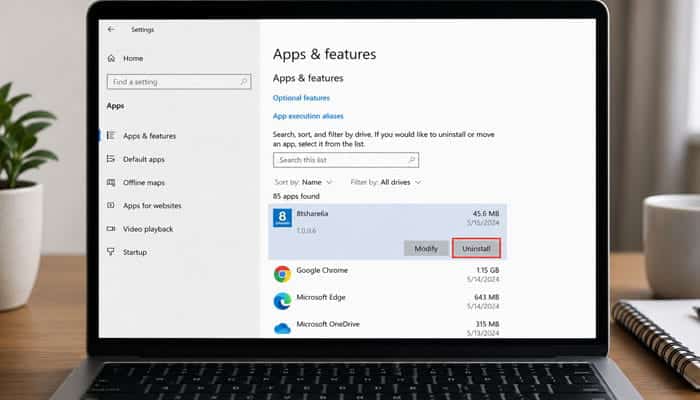
Because the exact installer is not consistently documented, use your operating system’s normal removal process.
Windows
Open
Settings → Apps → Installed apps
Find the application, confirm its name and publisher, then select Uninstall.
After removal
- restart the computer
- run a security scan
- review startup apps
- check browser extensions
macOS
Use the application’s official removal method when available or the normal macOS uninstall process.
Then review
- Login Items
- browser extensions
- background services
- configuration profiles
If suspicious behavior continues, seek qualified technical support rather than installing another unknown cleaner.
Why Repeated Claims Are Not the Same as Verification
Seeing the same specification on several websites does not necessarily mean several sources independently verified it.
One site may claim that 8tshare6a requires 4 GB RAM, and other sites may simply repeat the same figure.
That is why third-party requirements, prices and feature claims should be traced back to reliable first-party documentation whenever possible.
For an 8tshare6a Software Download
Source quality matters more than repetition.
12 Questions an Official 8tshare6a Download Page Should Answer
A clearly documented software product should make these answers easy to establish:
- What is the exact product name?
- Who legally develops and publishes it?
- How is ShareMate 2022 related to 8tshare6a?
- What is the latest version and release date?
- Where are the official Windows, macOS and Linux downloads?
- What are the exact installer filenames and file sizes?
- What are the official SHA-256 hashes?
- Who digitally signs the Windows installer, and is the Mac build notarized?
- What data does the desktop application collect or upload?
- Where are the software-specific Privacy Policy and EULA?
- What are the official prices, renewal terms and refund rules?
- Where are the changelog, security advisories and vulnerability-reporting instructions?
Clear answers to these questions would materially increase confidence in an 8tshare6a Software Download.
Is 8tshare6a Software Download a Scam?
The evidence reviewed does not justify automatically labeling the entire 8tshare6a website or every file carrying its name a scam.
That conclusion would go beyond the available evidence.
But this is equally important:
“It has not been proven to be a scam” is not the same as “this installer has been proven safe.”
The appropriate response is to verify the exact download before trusting it.
Is 8tshare6a Software Download a Virus?
A filename cannot answer that question.
Anyone can rename an executable.
A file called
8tshare6a-setup.exe
does not automatically prove that 8tshare6a published it.
A similarly named file could be
- an authentic installer
- an unofficial repack
- adware
- a modified program
- malware
- an unrelated executable
Instead of asking only
“Is 8tshare6a a virus?”
ask
“Who published this file, who signed it, what is its SHA-256 hash, where did it come from and what do security tools report?”
Those questions provide evidence you can actually evaluate.
Who Should Be Especially Careful?
Everyone should verify unfamiliar software, but the risk is greater on devices containing sensitive information.
Take extra care on computers containing
- financial records
- business documents
- customer information
- legal files
- stored passwords
- cryptocurrency credentials
- source code
- API keys
- administrator access
- confidential research
- healthcare information
- intellectual property
Employees should also follow company IT policies before installing unauthorized software on managed devices.
Alternatives If You Only Need File Sharing
You may not need an unfamiliar desktop application at all.
8tshare6a.com’s own download article discusses established file-sharing and cloud-storage options.
| Need | Better-Documented Approach |
|---|---|
| Ongoing shared folders | Established cloud-storage provider |
| Microsoft 365 collaboration | OneDrive |
| Google Workspace collaboration | Google Drive |
| Large-file transfers | Established file-transfer service |
| FTP/SFTP management | Reputable FTP/SFTP client |
| Local archives | Established compression utility |
| Sensitive business files | Organization-approved secure platform |
Do not install unfamiliar software simply to transfer a single file.
A Better Way to Think About Download Safety
Software safety is rarely a simple yes-or-no question.
Think in levels of confidence.
| Confidence Level | Typical Evidence |
|---|---|
| Very low | Random mirror and unknown publisher |
| Low | HTTPS site but unclear developer |
| Developing | Identifiable developer and product documentation |
| Moderate | Valid signature and expected version |
| Higher | Official source, signature and matching checksum |
| Strong | Transparent updates, privacy and licensing |
| Very strong | Established history and independent security review |
An arbitrary 8tshare6a Software Download from an unrelated mirror should not automatically be treated as high-confidence software.
What Evidence Would Improve Confidence?
Confidence could improve if a clearly identified developer published
- a dedicated product homepage
- official Windows, macOS and Linux downloads
- current version and release date
- exact installer filenames
- signed binaries
- SHA-256 hashes
- release notes and changelog
- software-specific privacy documentation
- an EULA
- transparent pricing
- refund and cancellation terms
- confirmed system requirements
- security documentation
- vulnerability reporting information
- dedicated product support
- verified app-store or repository listings
- a clear explanation of the relationship between 8tshare6a and ShareMate 2022
Confidence would decrease if an installer showed
- invalid signatures
- unexplained persistence
- credential access
- suspicious network activity
- credible malware detections
- hidden bundled software
- attempts to disable security protections
- publisher details that conflict with the claimed developer
The verdict should change when the evidence changes.
Final Thoughts
Based on the available evidence, an 8tshare6a Software Download should be approached cautiously rather than assumed to be safe or legitimate.
8tshare6a.com is active and publishes technology-related content, but its official-information page describes the site as an independent publication and information resource. Its current download page also does not resemble a typical software-vendor page with clearly documented installers, version numbers, checksums and release notes.
Many claims about Windows, macOS and Linux support, cloud storage, pricing, encryption, AI features and Version 2.5 come from third-party sources and should remain unverified until confirmed by first-party documentation.
There is also uncertainty around the relationship between 8tshare6a and ShareMate 2022, while the site’s Privacy Policy mainly covers website activity rather than clearly documenting desktop-software data practices.
Before installing any 8tshare6a Software Download, verify the developer, official source, version, digital signature and SHA-256 hash. Keep security protections such as Microsoft Defender SmartScreen or Apple Gatekeeper enabled.
8tshare6a Software Download FAQs
1. How can I verify an official 8tshare6a Software Download?
Check the developer, download domain, digital signature, version number and SHA-256 checksum. If these details cannot be matched to reliable first-party documentation, treat the installer as unverified.
2. Why do different websites describe 8tshare6a differently?
Third-party pages describe 8tshare6a as file-management, file-sharing and productivity software. These conflicting descriptions make it important to verify claims before downloading anything.
3. Can I trust the reported 8tshare6a pricing?
Not automatically. Prices such as monthly or annual plans should be treated as reported claims until they appear on a clearly identifiable official billing or product page.
4. Does 8tshare6a Software Download collect personal data?
The current website Privacy Policy mainly discusses website activity. Clear documentation explaining desktop-app telemetry, cloud-file storage and software-specific data collection has not been established.
5. How do I know which 8tshare6a version is current?
Look for an official changelog, release date and version number from the developer. Third-party version claims should not be considered confirmed without matching first-party release information.
6. Is ShareMate 2022 connected to 8tshare6a?
The relationship is unclear. Some 8tshare6a content also refers to ShareMate 2022, but the available documentation does not clearly establish whether they are the same product.
7. Should an 8tshare6a installer require administrator access?
Some applications legitimately require administrator privileges, but the request should match the software’s purpose. Unexpected or excessive permissions are a reason to investigate before continuing.
8. Is a clean security scan enough to trust an 8tshare6a Software Download?
No. A clean scan is useful, but it does not guarantee safety. Combine it with publisher verification, a valid digital signature, a matching checksum and a trusted download source.
