

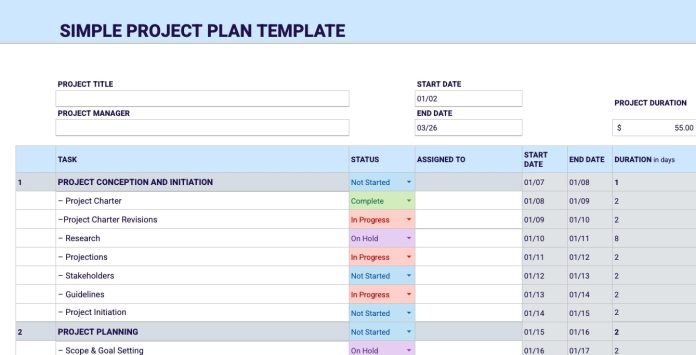

Project planning templates are helpful tools that make work easier, clearer, and more organized. Whether you are managing a small personal task or a large business project, these templates help you plan everything step by step. Instead of starting from scratch every time, you can use a ready-made format that saves time and reduces confusion.
In this guide, we will explain project planning templates in very simple words, why they matter, how they are used, and which types are most useful.
What Are Project Planning Templates?
A project planning template is a pre-designed document or layout that helps you plan a project. It shows what information you need to write down, such as goals, tasks, deadlines, team members, and progress.
Think of it like a roadmap. When you follow a roadmap, you know where to go and how to reach your destination. In the same way, a project planning template guides you from the start of a project to the finish.
These templates can be used in:
-
Word documents
-
Excel or Google Sheets
-
Project management tools
-
PDFs or printed forms
Why Project Planning Templates Are Important
Many projects fail not because of lack of effort, but because of poor planning. Project planning templates help avoid common problems.
Here are some simple reasons why they are important:
1. They Save Time
You do not have to create a plan from zero. The structure is already there.
2. They Keep Things Clear
Everyone understands what needs to be done, when it needs to be done, and who is responsible.
3. They Reduce Mistakes
When tasks and deadlines are written clearly, fewer things are forgotten.
4. They Improve Team Communication
All team members follow the same plan, so there is less confusion.
5. They Help Track Progress
You can easily see what is done and what still needs work.
Key Parts of a Project Planning Template
Most project planning templates include a few basic sections. These sections help organize the entire project.
Project Overview
This section explains what the project is about. It includes the project name, purpose, and short description.
Goals and Objectives
Here you write what you want to achieve. Clear goals help keep the project focused.
Task List
This is one of the most important parts. It breaks the project into small tasks so work feels manageable.
Timeline or Schedule
This shows start dates, end dates, and deadlines for each task.
Team Roles
This section lists who is responsible for each task.
Resources
Here you note tools, software, money, or materials needed for the project.
Risks and Challenges
This part helps you think ahead about possible problems and how to handle them.
Progress Tracking
This helps you monitor how much work is completed and what remains.
Common Types of Project Planning Templates
Different projects need different templates. Below are some popular and useful types.
1. Basic Project Plan Template
This is best for small or simple projects. It includes:
-
Project name
-
Goals
-
Task list
-
Deadlines
It is easy to use and perfect for beginners.
2. Task Breakdown Template
This template focuses on dividing work into small steps. Each task is listed with:
-
Description
-
Assigned person
-
Start and end date
-
Status
It helps prevent overwhelm and keeps work organized.
3. Project Timeline Template
This template shows tasks in order over time. It helps you see:
-
Which tasks come first
-
Which tasks depend on others
-
How long the project will take
It is useful for managing deadlines.
4. Gantt Chart Template
A Gantt chart is a visual timeline. Tasks are shown as bars on a calendar. It helps you:
-
See overlaps
-
Track progress visually
-
Manage long projects
This is popular in business and large projects.
5. Resource Planning Template
This template focuses on what is needed to complete the project. It includes:
-
Team members
-
Tools and software
-
Budget
-
Equipment
It helps avoid shortages and delays.
6. Risk Management Template
This template helps identify problems before they happen. It includes:
-
Possible risks
-
How serious they are
-
Solutions or backup plans
It is very helpful for complex projects.
7. Weekly or Daily Planning Template
This template focuses on short-term planning. It helps you:
-
Plan daily tasks
-
Track weekly goals
-
Stay productive
It works well for freelancers and remote workers.
How to Use Project Planning Templates Effectively
Using a template is easy, but using it correctly makes a big difference.
Keep It Simple
Do not overfill the template with unnecessary details. Write only what matters.
Update Regularly
Projects change. Update tasks, dates, and progress often.
Share with the Team
Make sure everyone can see the plan and understand their role.
Be Flexible
Templates are guides, not rules. Adjust them when needed.
Review Progress
Check the template weekly to see what is going well and what needs attention.
Who Can Use Project Planning Templates?
Project planning templates are useful for almost everyone.
They are great for:
-
Students working on assignments
-
Freelancers managing clients
-
Business teams handling projects
-
Website owners planning content
-
Event planners organizing events
-
Software and game developers
-
Personal goals and daily planning
You do not need special skills to use them.
Benefits of Using Project Planning Templates Long Term
When you use project planning templates regularly, you develop better habits.
Over time, you will:
-
Plan faster
-
Stay more organized
-
Finish projects on time
-
Reduce stress
-
Improve teamwork
-
Make better decisions
Planning becomes a natural part of your workflow.
Final Thoughts
Project planning templates are simple tools, but they have powerful benefits. They help turn ideas into clear steps, reduce confusion, and keep work on track. You do not need expensive software or advanced knowledge to use them. Even a basic template can make a big difference.
If you often feel lost while managing projects, start using a project planning template today. With clear planning, your projects will feel easier, smoother, and more successful from start to finish.
