



Introduction: Why Delete Instagram
Instagram is one of the most widely used social media platforms in the world — but it isn’t for everyone. Many people search for how to delete an account on Instagram because they want to quit the platform permanently due to privacy concerns, excessive time spent scrolling, or a desire to reduce their online footprint. Others might simply want a fresh start with a new account or shift their focus to other platforms. If you’re thinking about stepping away from Instagram, you may be wondering how to delete Instagram account permanently.
In this comprehensive guide, we’ll show you how to delete your Instagram account for good, step by step, and explain the difference between deleting and deactivating your account. You’ll learn what happens after account deletion, how to download your data before removing your profile, and key considerations before taking the plunge.
Whether you’re seeking a permanent break or just exploring your options, this guide will help you make an informed decision and walk you through the process of reclaiming your digital space.
What Happens When You Delete Your Instagram Account
Before you delete your account, it’s critical to understand the consequences:
- Your profile, photos, videos, comments, and likes are removed and can no longer be accessed on the platform.
- Your account goes into a 30‑day disabled period first — during this time, your profile is hidden and you can still log in to cancel the deletion. After this period, deletion becomes permanent.
- Your username becomes available for use by other people once deletion is complete.
- Messages you’ve sent to others may still appear in direct messages even after deletion.
- Some residual data may remain on backup servers for up to 90 days as part of Instagram’s data retention policy.
Deleting your Instagram account does not automatically remove all traces of your activity from the internet — especially if your content was shared, copied, or indexed elsewhere online.
How to Delete Instagram Account – Step‑by‑Step Instructions
You can delete your account using either the Instagram mobile app or a web browser on a computer or smartphone. Both methods follow similar processes.
Delete Instagram Account From Mobile App
- Open the Instagram app and log in to your account.
- Tap your profile icon in the bottom right and then the menu (three lines) in the top corner.
- Go to Settings and privacy > Accounts Center > Personal details.
- Select Account ownership and control.
- Tap Deactivation or deletion, then choose the account you want to delete.
- Choose Delete account and tap Continue.
- Select a reason for leaving, re‑enter your password, and confirm.
- Your account will be scheduled for deletion. You have up to 30 days to cancel by logging back in.
Delete Instagram Account From Web Browser
- Open a browser and visit Instagram at instagram.com and log in.
- Click More > Settings in the left‑hand menu.
- Go to Accounts Center > Personal details > Account ownership and control.
- Select Deactivation or deletion, choose Delete account, and hit Continue.
- Re‑enter your login details and reason for deleting, then confirm.
- Your profile will go into the 30‑day deletion period.
How to Deactivate Instagram Instead (Temporarily)
If you’re not ready to quit for good, Instagram allows you to deactivate your account:
- Go to Settings > Accounts Center > Account ownership and control.
- Select Deactivation or deletion.
- Choose Deactivate account and hit Continue.
- Follow the steps to confirm.
- Your profile and posts will be hidden but retrievable when you log back in.
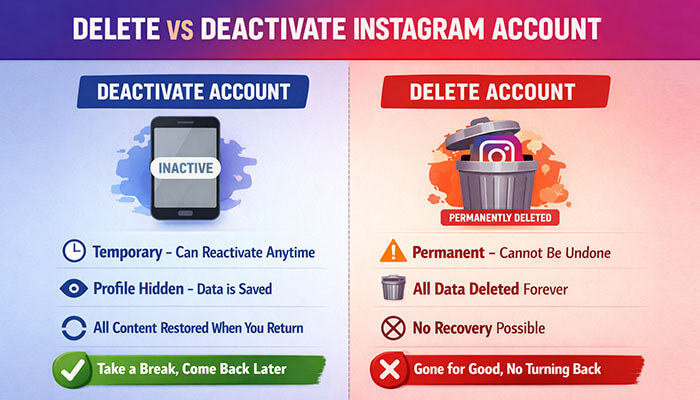
Delete vs Deactivate: Key Differences
Understanding the difference helps you decide the right action for your needs:
- Delete Instagram account: Permanently removes your content and profile.
- Deactivate Instagram account: Temporarily hides your profile and data from others but keeps it stored for reactivation.
- Deactivated accounts can be restored anytime; deleted accounts are irretrievable after 30‑day period.
Backing Up Your Instagram Data Before Deletion
Before deleting your account, it’s wise to download your data:
- Go to Settings & privacy > Accounts Center > Your information and permissions.
- Tap Download your information.
- Choose the format and quality (e.g., HTML or JSON).
- Save the downloaded content to your device.
This backup ensures you keep your photos, videos, posts, and other content before there’s no going back.
Delete vs Deactivate Instagram Account
| Feature | Delete Account | Deactivate Account |
|---|---|---|
| Account visibility | Removed permanently | Hidden |
| Recoverable after action | Only within 30 days | Yes, anytime |
| Data stored on server | Removed after 30–90 days | Yes, stored |
| Username availability | Frees up username | Retains username |
| Best for | Permanent exit | Temporary break |
Important Notes and Tips
- You must be able to log in to delete or deactivate your Instagram account. Instagram won’t process deletion requests for accounts you can’t access.
- Uninstalling the app does not delete your account — it remains active unless you request deletion.
- After deletion, your username becomes available for others unless tied to another Facebook or Meta account.
- Even after deletion, some fragments of your data may persist in Instagram’s backup systems for safety or legal reasons.
How to Delete Instagram Account (FAQs)
Q1. Can I delete my Instagram account from the app?
Yes — you can delete your Instagram account using the app by navigating to Account ownership and control > Deactivation or deletion.
Q2. How long does Instagram give me to cancel a deletion?
Instagram provides a 30‑day window to log back in and cancel your deletion request.
Q3. Is deleting the account permanent?
Yes. After the 30‑day grace period, your profile, posts, and data are permanently removed.
Q4. Will my messages disappear after deletion?
Messages you’ve sent to others may remain in their inboxes even after your account is deleted.
Q5. Can I delete Instagram without my password?
No. You must know your password to confirm deletion. If you forget it, reset it first.
Q6. What’s the difference between deactivating and deleting Instagram?
Deactivating is temporary and reversible; deleting is permanent. After deactivation, your data is still stored. After deletion, it’s removed once the grace period ends.
Final Thoughts on Deleting an Instagram Account
Deciding to delete your Instagram account is a significant step, one that comes with both benefits and potential drawbacks. Whether you’re looking to reclaim your privacy, reduce distractions, or take a break from the pressures of social media, permanently removing your Instagram profile can be a refreshing change. However, it’s important to weigh the consequences, such as the loss of your photos, videos, and followers, and to understand that recovery is only possible within 30 days.
If you’re unsure about completely deleting your account, deactivating it temporarily is a great alternative to consider. Ultimately, the choice depends on your goals and how you want to manage your online presence. Before making your decision, ensure that you’ve backed up any important data and are clear about the impact of your choice. Regardless of your decision, take control of your digital space and make sure it aligns with your personal needs and priorities.
