


Managing an Airbnb business in 2026 is no longer just about replying to messages and updating a calendar. As hosts grow from one listing to multiple properties, Airbnb account software becomes the system behind pricing, availability, guest communication, automation, accounting, direct booking, and team workflows.
If you are searching for the right airbnb account software, the goal is not simply to add more tools. The real goal is to choose software that reduces manual work, lowers double-booking risk, keeps pricing and availability accurate, improves response speed, supports future direct bookings, and gives you a more reliable setup as your hosting business grows.
The best airbnb account software in 2026 is the one that matches your hosting size, booking mix, and day-to-day workflow.
For most hosts, the most important features are:
- channel management
- calendar sync and pricing control
- automated guest messaging
- reservation and task management
- reporting and analytics
- accounting or trust accounting support
- direct Airbnb integration or recognized software partner status
- support for direct booking growth
- mobile operations for on-the-go management
Airbnb’s 2025 Preferred Software Partner program suggests that integration quality, reliability, and platform performance are important signals when evaluating software. Airbnb also maintains a software partner directory for hosts comparing providers.
What Is Airbnb Account Software?
Airbnb account software is software used to manage one or more Airbnb listings more efficiently. Depending on the product, it may include:
- property management system features
- channel management across Airbnb and other booking sites
- guest communication tools
- automation for reviews, tasks, and check-in workflows
- accounting and owner payout support
- team access and operations management
- direct booking website tools
- mobile task and reservation management
In practice, this means the market includes more than one type of tool. Some products are lightweight Airbnb automation tools for smaller hosts. Others are full operating systems for larger property managers.
Why Hosts Use Airbnb Account Software in 2026
The larger your hosting operation becomes, the harder it is to manage everything manually. Even one listing can create repetitive work, but several listings across multiple channels can quickly become difficult to control.
That is why hosts increasingly use Airbnb account software for:
- avoiding double bookings
- syncing rates and calendars
- speeding up guest replies
- coordinating cleaning and maintenance
- tracking payouts and owner statements
- managing team members or co-hosts
- supporting direct booking growth alongside OTA channels
For many hosts, Airbnb account software is no longer optional once the business moves beyond a simple side project.
Best Airbnb Account Software Categories
Instead of pretending one tool is perfect for everyone, it is more useful to think in categories.
1. Property Management Software
Property management software is best for hosts who want one main dashboard for reservations, messaging, task coordination, reporting, and multi-property operations.
This category is usually best for:
- multi-property hosts
- co-hosting businesses
- small vacation rental teams
- professional property managers
2. Channel Manager Software
Channel managers focus on availability, pricing, and listing distribution across booking platforms.
This category is usually best for:
- hosts listing on Airbnb plus Vrbo or Booking.com
- businesses worried about calendar conflicts
- operators who change rates often
3. Automation and Guest Messaging Tools
Some hosts mainly need better communication, scheduled replies, and workflow automation rather than a full PMS.
This category is usually best for:
- solo hosts
- co-hosts
- small portfolios
- operators trying to save time on repetitive messaging
4. Accounting and Trust Accounting Tools
Financial operations become more complex as you scale. Some tools are built specifically for owner statements, reconciliation, trust accounting, and reporting.
This category is usually best for:
- hosts managing owner properties
- managers paying vendors and owners
- businesses that need cleaner reporting and reconciliation
- operators in regulated environments
Airbnb Account Software Comparison Table
| Software category | Best for | Main strengths | Main limitation |
|---|---|---|---|
| Property management software | Multi-property hosts and managers | Central dashboard, reservations, messaging, tasks, reporting | Can be more complex than needed for one listing |
| Channel manager | Multi-channel distribution | Calendar sync, pricing sync, fewer discrepancies | May not include deep accounting or operations tools |
| Guest messaging and automation tool | Solo hosts and small portfolios | Faster replies, templates, workflow automation | Usually narrower than a full PMS |
| Accounting or trust accounting software | Owner-heavy and finance-heavy operations | Reconciliation, owner statements, trust accounting | Often needs other tools for guest or listing operations |
| Revenue management tool | Hosts focused on pricing optimization | Dynamic pricing, gap-night filling, rate rules | Often works best with a PMS or channel manager |
| Direct booking platform | Hosts building brand and repeat bookings | Booking engine, website, fee savings, branding | Usually needs setup and marketing work |
This comparison helps readers move faster from research to decision-making.
Best Airbnb Account Software Features to Look For
People do not just want brand names. They want to know which features actually matter when choosing Airbnb account software.
Channel Sync and Calendar Accuracy
This is one of the first features to prioritize in Airbnb account software.
Look for:
- real-time calendar sync
- availability rules
- rate sync
- multi-channel reservation management
- low-risk listing mapping
Centralized Guest Messaging
If a host receives inquiries through several listings or channels, communication becomes fragmented fast.
Look for:
- unified inbox
- message templates
- scheduled replies
- automation based on booking stage
- team assignment and visibility
Listing and Reservation Management
A strong tool should help you manage listings and reservations without confusion.
Look for:
- listing creation and editing controls
- reservation timeline visibility
- cancellation and modification handling
- notes and internal tagging
- multi-user permissions
Automation for Operations
Operational automation becomes more important once turnovers and guest workflows increase.
Look for:
- automated cleaning task creation
- check-in and checkout workflow triggers
- automated review requests
- smart lock or device integrations
- payment reminders
Reporting and Analytics
Good software should show more than occupancy.
Look for:
- occupancy and ADR tracking
- revenue reporting
- booking source breakdown
- cancellation metrics
- owner and property performance reports
Accounting or Trust Accounting Support
This matters much more as hosting becomes a real business.
Look for:
- bank reconciliation
- owner statements
- payout tracking
- trust accounting tools
- QuickBooks or accounting integrations
Data Security and Integration Quality
This is especially important if your software touches guest data, team workflows, and connected systems. Strong Airbnb account software should also support secure integrations and clear access controls.
Look for:
- official Airbnb integration
- transparent security documentation
- role-based permissions
- audit trail visibility
- data export controls
Direct Booking Features to Look For in Airbnb Account Software
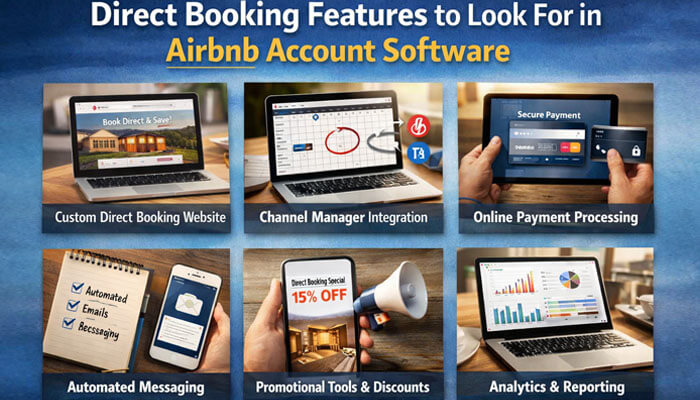
This is one of the most important sections because many hosts eventually want software that helps them manage Airbnb while also growing direct reservations from their own website.
Common direct-booking features include:
- direct booking website or booking engine
- real-time sync between direct bookings and Airbnb
- quote and payment handling
- cancellation and fee controls
- SEO-friendly property pages
- review imports and trust elements
- repeat guest marketing support
Direct booking is not always a day-one requirement. But it becomes much more valuable once hosts want more brand control, more repeat business, and less dependence on a single channel.
Hosts should also make sure any third-party workflow still fits Airbnb’s software-connected listing rules and platform policies. Listings created through software must still comply with Airbnb’s listing policies.
Mobile Operations and Team Management Tools
Mobile management is no longer a bonus feature. For hosts using airbnb account software, it is now a real buying factor when handling guest issues, cleaners, maintenance, and team communication away from a desk.
Look for:
- mobile inbox access
- booking and calendar visibility
- mobile task management
- cleaner and maintenance coordination
- quick-reply templates
- push notifications for urgent guest issues
This matters because many hosts do not run their Airbnb business from a desktop all day.
How AI Is Changing Airbnb Account Software in 2026
AI is now a bigger part of vacation-rental software than it was a year or two ago. Many Airbnb account software tools now promote AI-assisted messaging, content support, and workflow efficiency.
Look for:
- AI-assisted guest replies
- inbox summaries
- message drafting with house-rule awareness
- AI content support for listings or websites
- workflow suggestions based on booking stage
AI should still be treated as a support tool, not a replacement for host oversight. The best AI features usually save time without reducing control.
Dynamic Pricing and Revenue Management Features to Look For
Dynamic pricing is one of the strongest reasons hosts move from manual workflows to software-assisted operations.
Look for:
- dynamic pricing based on demand signals
- minimum and maximum price guardrails
- gap-night pricing rules
- weekend and seasonal overrides
- occupancy-based pricing logic
- length-of-stay discounts or premiums
- event-based and local market adjustments
For many hosts, dynamic pricing is not just an extra feature. It is the feature that most directly affects revenue.
Best Airbnb Account Software by Host Size
For One Property
If you manage one Airbnb listing, you may not need a full enterprise PMS. For many smaller hosts, Airbnb account software is most useful when it stays simple and easy to manage.
Best fit:
- simple automation software
- entry-level channel management
- easy guest messaging tools
For Two to Ten Properties
This is where Airbnb account software usually starts to create real ROI.
Best fit:
- all-in-one PMS
- channel manager
- centralized messaging
- task automation
- reporting dashboard
For Professional Managers
If you manage owner properties or a larger portfolio, accounting depth, team permissions, reporting, and operations become much more important.
Best fit:
- advanced PMS
- trust accounting support
- owner statement reporting
- team workflow management
- deep integrations
Best Airbnb Account Software by Host Type
Solo Host
For a solo host, Airbnb account software is usually most valuable when it keeps messaging, pricing, and calendar control simple.
Best choice: simple messaging automation, pricing help, and calendar sync.
Pros
- easier to learn
- lower software cost
- quicker setup
Cons
- limited reporting depth
- may need to upgrade later
Co-Host or Small Team
For a co-host or small team, Airbnb account software should make communication, permissions, and shared workflows easier to manage.
Best choice: unified inbox, task workflows, permissions, and shared calendar control.
Pros
- clearer accountability
- fewer missed messages
- better turnover coordination
Cons
- more setup than solo-host tools
- team permissions matter more
Property Manager
A property manager usually needs Airbnb account software built for scale, reporting, owner management, and stronger operational control.
Best choice: full PMS, channel management, owner management, trust accounting, and reporting.
Pros
- built for scale
- stronger owner reporting
- better operations control
Cons
- steeper onboarding
- higher cost
Owner-Manager or Finance-Heavy Operator
Best choice: software with owner statements, payment workflows, reconciliation, and trust accounting support.
Pros
- cleaner financial oversight
- better reporting discipline
- easier owner communication
Cons
- may require more training
- can be overkill for casual hosting
Examples of Airbnb Software Partners and Market Tools
Airbnb’s software partner ecosystem includes a wide range of tools, and different products are designed for different types of hosts. Airbnb says integrated software can be used to publish listings and manage them directly through PMS or channel manager software.
A useful way to think about selection is:
- some tools are better known for lightweight automation and time savings
- some are built for scaling from small portfolios to larger operations
- some combine channel management, messaging, direct booking, and broader operational control
- others are stronger in accounting-heavy or owner-management workflows
That does not mean one type is automatically best for every business. It simply means the market includes different tools for different operational needs.
Airbnb Account Software Pricing: What Hosts Usually Pay
Airbnb account software is commonly priced in one of these ways:
- per listing per month
- flat monthly subscription
- booking-volume or portfolio-tier pricing
- custom pricing for larger managers
- add-on pricing for direct booking, dynamic pricing, accounting, or premium support
The main lesson is simple: the cheapest software is not always the best value. A low monthly price can become expensive if you still need extra tools for messaging, pricing, owner payouts, direct booking, or reporting.
iCal Calendar Sync vs Full Airbnb Software Integration
Not every host needs full software immediately, so this comparison matters.
Airbnb still supports iCal-based calendar import and export. Basic iCal calendar syncing can work for smaller hosts with simpler availability needs, but it is more limited than a full software connection for centralized multi-channel workflows, real-time operational control, and broader automation.
iCal sync is usually better for:
- very small hosts
- basic calendar blocking
- simple two-platform setups
Full software integration is usually better for:
- multi-property hosts
- real-time pricing and availability workflows
- automation, messaging, and operational control
- scaling beyond basic calendar syncing
This helps beginners choose the right level of complexity instead of buying software too early or waiting too long.
Airbnb Policies for Listings Created Through Software
Using software does not remove the need to follow Airbnb rules.
Listings created through software still need to comply with Airbnb’s listing policies, and local or regional rules may also apply depending on the property location. Hosts with existing listings should map and connect them carefully during setup to avoid duplicate listings, sync issues, or unnecessary disruption. Airbnb’s software-listing policy states that listings created using software must comply with its listing rules.
A practical reminder here is simple: software can improve operations, but it does not replace compliance.
How to Choose the Right Airbnb Account Software
1. Start With Your Real Bottleneck
Do not choose based on popularity alone. First identify the biggest pain point.
Common bottlenecks include:
- too many manual messages
- double-booking risk
- no clear reporting
- owner payout confusion
- poor team coordination
- inability to scale
2. Check Official Airbnb Connectivity
Official integration is one of the easiest trust signals to review. Airbnb maintains an official software partner directory, and its help pages explain how software-connected listings work.
3. Compare Sync Rules Carefully
Before choosing, check:
- where listing edits must be made
- what syncs in real time
- how reservations are mapped
- what happens if a listing already exists
Airbnb notes that editing software-connected listing details on Airbnb depends on sync settings, which is why control rules should be reviewed before setup.
4. Evaluate Financial Depth Early
If you plan to scale, accounting and reconciliation matter sooner than most hosts expect.
5. Review Data Handling and Privacy
Before committing, check:
- privacy policy clarity
- data retention controls
- team permissions
- guest data access scope
- export and deletion options
Common Airbnb Software Integration Limits and Sync Issues
Many hosts assume a connected listing behaves the same everywhere. That is not always true.
Common issues to watch for:
- listing content controlled in the PMS instead of Airbnb
- availability syncing correctly while some content fields do not
- duplicate or mismatched listing mapping during setup
- unexpected workflow changes after connecting software
- team confusion about where edits should be made
Understanding this early helps avoid one of the most common software adoption mistakes.
Setup Checklist Before Connecting Software to Airbnb
Before connecting software to Airbnb, check:
- whether your listing already exists on Airbnb
- which team members need access and permissions
- which data should sync first
- whether pricing rules are ready
- whether calendar availability is accurate
- whether message templates are prepared
- whether owner and payout workflows are defined
- whether privacy and data access policies are acceptable
- whether you know where future edits must be made
A short checklist now can prevent bigger sync and workflow problems later.
How to Switch Airbnb Software Without Breaking Your Listings
Switching software is possible, but it should be done carefully.
A safe switching process usually looks like this:
- audit your current listings and reservations
- confirm which software currently controls sync and edits
- disconnect listings individually
- remove account access from the old provider
- connect the new provider carefully
- verify mapping, calendar sync, and pricing rules
- test one listing before fully migrating
Airbnb’s help guidance on switching providers says hosts should disconnect listings individually, remove account access from the current provider, and then connect the new software provider.
This is especially important for hosts who already have bookings, pricing rules, and listing content inside an existing system.
Why Onboarding and Support Matter When Choosing Software
This is often overlooked, but it matters a lot in real operations.
Before buying, check:
- whether onboarding is self-serve or guided
- whether migration support is included
- whether support is chat, email, phone, or help-center only
- whether setup documentation is strong
- whether the vendor supports your host size and workflow
A strong feature list means much less if setup is confusing or support is weak.
Questions to Ask Before Choosing Airbnb Account Software
Ask these questions before buying:
- Does it sync in real time?
- Can I manage listings outside Airbnb too?
- Who controls listing edits after connection?
- Does it support owner statements or trust accounting?
- Is it better for one property or for a larger portfolio?
- Does it include dynamic pricing or require another tool?
- Does it support team permissions and co-host workflows?
- Is it an official Airbnb software partner?
- What happens when I switch providers later?
- How is guest data handled and protected?
- Does it include a direct booking site or booking engine?
- Is there a mobile app for tasks and guest communication?
These questions help readers evaluate software based on real operational needs, not just sales pages.
What Metrics to Track After You Set Up Airbnb Account Software
Software is only valuable when it improves decisions, not just dashboards.
After setup, track:
- occupancy rate to see how often nights are filled
- ADR to measure average daily rate
- RevPAR to understand revenue per available rental night
- booking source mix to compare Airbnb, direct, and other channels
- cancellation rate to spot operational issues
- NOI or operating margin if you manage properties as a business, not just side income
These metrics help turn software from a tool into a performance system.
Benefits of Using Airbnb Account Software
When chosen well, the benefits are practical.
Less Manual Work
Automation reduces repetitive communication, scheduling, and admin tasks.
Fewer Calendar and Pricing Errors
Stronger sync and rule management can reduce mistakes across listings and channels.
Better Guest Experience
Faster replies, cleaner workflows, and fewer operational errors improve consistency.
Easier Scaling
Software makes it easier to manage more listings without losing control.
Stronger Financial Visibility
Accounting and reporting tools improve visibility into payouts, statements, and property performance.
Potential Drawbacks to Know Before You Buy
A good article should also be honest about tradeoffs.
More Complexity Than Some Hosts Need
A solo host with one listing may not need a heavy all-in-one system.
Sync Misunderstandings
Control over edits, pricing, and content may change once software is connected.
Cost Stacks Up
Monthly software costs can grow when you add channel management, automation, dynamic pricing, accounting connectors, direct booking tools, or premium onboarding.
Data and Vendor Dependence
Once your workflows live inside one platform, switching can take planning.
Common Mistakes When Choosing Airbnb Account Software
Buying for Features You Will Never Use
Choose the tool that solves your next business problem, not someone else’s setup.
Ignoring Official Integration Status
If Airbnb connectivity is central to your workflow, integration quality matters.
Overlooking Accounting Needs
Many hosts focus on calendars first and only later realize they need better reconciliation and reporting.
Not Checking Privacy and Access Controls
Guest and booking data can move through third-party tools, so permissions and vendor policies matter.
Underestimating Setup and Support
Even good Airbnb account software can become frustrating if onboarding and support are weak.
Is Airbnb Account Software Worth It?
For many hosts, yes.
The value becomes clearer when manual work starts costing time, consistency, or money. For a single casual host, the answer depends on workload. For a growing host or property manager, software often becomes part of the business infrastructure rather than an optional extra.
Final Verdict
The best airbnb account software in 2026 is not the one with the longest feature list. It is the one that matches your portfolio size, sync needs, operational complexity, pricing strategy, direct-booking goals, and financial workflow.
If your biggest issue is manual communication, start with automation and centralized messaging. If you list across channels, prioritize a strong channel manager. If you manage owners or a larger portfolio, prioritize accounting depth, reporting, and operations management. If your revenue is inconsistent, prioritize dynamic pricing and revenue tools. If you want more long-term control over your business, look for direct booking tools, mobile operations, solid onboarding, and clear support.
Airbnb Account Software FAQs
1. How often does Airbnb iCal calendar sync update?
Unique enough. Your article already mentions iCal vs full integration, but it does not mention the 3-hour refresh timing or manual refresh detail, so this adds fresh value.
2. Can software-connected Airbnb hosts collect any fees off the Airbnb platform?
Yes, this is unique. Your article talks about software and compliance broadly, but it does not cover Airbnb’s off-platform fee exceptions for select software-connected hosts.
3. Can you change the address of a software-connected Airbnb listing after the first booking?
Yes, this is unique and strong. It adds a very specific operational limitation that is not already explained in your article.
4. Can you create a test booking when setting up Airbnb account software?
Yes, unique. This is a practical setup question and does not overlap with your current FAQ section.
5. What types of software does Airbnb officially support for hosts?
This one is the least unique of the five, because your article already discusses PMS, channel managers, operations, and related software categories. Still, this version adds value because it ties those categories directly to Airbnb’s official API/program language.
