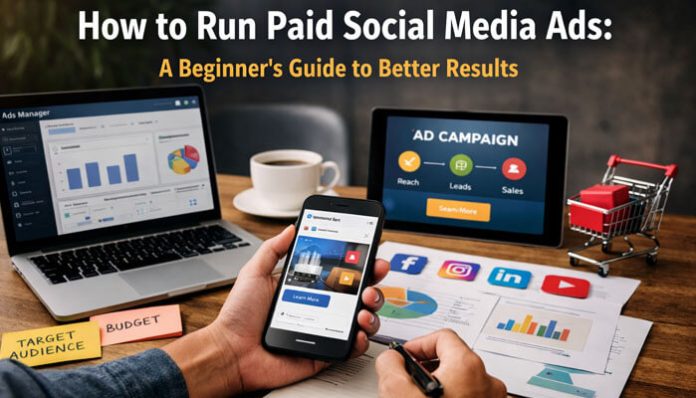

Most major platforms now organize campaigns around objectives, targeting, budgets, placements, and auctions. That means success starts with choosing the right goal and building the campaign around it.
If you are learning how to run paid social media ads, one of the biggest mistakes is thinking ads are only about boosting posts. Strong campaigns depend on clear goals, accurate tracking, audience quality, platform-fit creative, landing page experience, policy compliance, and ongoing optimization.
This guide explains how to run paid social media ads step by step, which platforms to use, how to choose the right objective, how to set up tracking, how to build better ads, and how to improve results over time.
What Are Paid Social Media Ads?
Paid social media ads are sponsored placements that appear on platforms like Facebook, Instagram, LinkedIn, TikTok, YouTube, Pinterest, and X. Businesses pay to show these ads to selected audiences based on demographics, interests, behaviors, job roles, intent signals, or retargeting data, depending on the platform.
To understand how to run paid social media ads, it helps to know why they work so well: they combine distribution with targeting. Instead of publishing content and hoping the right people see it, you tell the platform what result you want, who you want to reach, how much you want to spend, and what creative to show. The platform then uses its delivery system and auction to show the ad to people most likely to take the action you want.
Why Businesses Use Paid Social Media Ads
Paid social is useful for more than big brands. It can work for local businesses, ecommerce stores, SaaS brands, agencies, consultants, coaches, B2B companies, and creators. For businesses learning how to run paid social media ads, this approach can support both short-term visibility and long-term growth.
Common reasons businesses run paid social media ads include:
- increasing brand awareness
- driving website traffic
- generating leads
- improving engagement or video views
- getting app installs
- increasing sales and conversions
- retargeting people who already showed interest
These goals align closely with how major ad platforms structure campaign objectives today.
What You Need Before You Run Paid Social Media Ads
Before launching your first campaign, make sure the essentials are ready. Many beginners focus only on the ad itself, but the setup behind the campaign matters just as much. If you want to learn how to run paid social media ads successfully, these basics need to be in place first.
You will usually need:
- a business account or page
- access to the ad manager
- a valid payment method
- a connected business profile or page
- tracking installed on your website
- a working landing page
- approved ad creatives
- one clear conversion goal
Without these basics, campaigns may struggle with delivery, tracking accuracy, or approval delays.
How Paid Social Media Ads Work
To understand how to run paid social media ads, it helps to break the process into a simple workflow:
- Choose a campaign objective.
- Define the target audience.
- Set budget, placements, and bidding.
- Create the ad using copy, image, video, and CTA.
- Enter the ad into the platform auction.
- Let the system deliver ads based on predicted results, bid, and relevance.
- Review performance and optimize.
This process is similar across major ad platforms, even if the interface looks different.
Step 1: Start With One Clear Goal
The first step in learning how to run paid social media ads is choosing one primary goal. This matters because the platform will optimize delivery based on the objective you select.
For example:
- choose Awareness for reach and visibility
- choose Traffic for website clicks
- choose Engagement for likes, comments, or interactions
- choose Leads for form fills or inquiries
- choose Sales or Conversions for purchases or valuable actions
A common beginner mistake is choosing an objective that looks cheaper instead of choosing the one that matches the real business outcome. If your goal is qualified leads, an engagement campaign is usually not the best place to start.
Step 2: Choose the Right Platform
Not every social platform works equally well for every business. The best choice depends on your audience, offer, content style, and buying journey.
Meta Ads: Facebook and Instagram
Meta is strong for ecommerce, local services, broad consumer reach, retargeting, and lead generation. It offers flexible placements and a mature advertising system.
LinkedIn Ads
LinkedIn often costs more than broad consumer platforms, but it can work very well for B2B, recruiting, SaaS, professional services, and high-value lead generation. It also offers native Lead Gen Forms, which can reduce friction.
TikTok Ads
TikTok is useful for awareness, short-form storytelling, creator-style ads, impulse-friendly products, and app growth. Creative usually performs best when it feels native to the platform.
A simple beginner rule is to start where your audience already spends time. It is usually better to master one platform first than spread your budget too thin.
Step 3: Build a Simple Funnel Before You Launch
One reason beginners waste money is running ads without a clear funnel. Even a simple funnel can improve results. When learning how to run paid social media ads, it helps to map the customer journey before launching anything.
A beginner-friendly paid social funnel looks like this:
- Top of funnel: awareness or video-view ads to cold audiences
- Middle of funnel: traffic or engagement ads to interested people
- Bottom of funnel: lead or sales ads to warm audiences, site visitors, or retargeting groups
If your budget is small, keep things simple with one goal, one landing page, a few audiences, and a few creative variations.
Step 4: Install Tracking Before Spending Money
Before launching, make sure you can measure results. Without tracking, you will not know which ad, audience, or placement is actually working.
Depending on the platform, this may include:
- Meta Pixel
- Meta Conversions API
- LinkedIn Insight Tag
- TikTok Pixel
- Google Analytics with conversion events
The most useful tracked actions for beginners usually include:
- page views
- form submissions
- add to cart
- checkout started
- purchases
- booked calls
- app installs
How to Set Up Tracking for Paid Social Media Ads
Installing a basic pixel is a good first step, but stronger campaigns often perform better when browser-based tracking is paired with server-side tracking.
A stronger setup may include:
- pixel installation on key pages
- server-side tracking like Conversions API
- standard events such as Lead, Purchase, AddToCart, and ViewContent
- duplicate event handling
- confirmation-page or event-based triggers
- CRM follow-up when lead quality matters
Better tracking gives platforms stronger conversion signals and improves optimization.
Step 5: Define Your Target Audience Carefully

Audience targeting is one of the most important parts of learning how to run paid social media ads. Even strong creative can fail if it reaches the wrong people.
A beginner-friendly structure usually includes these audience types:
Core Audiences
Based on age, location, interests, demographics, or job-related traits.
Custom Audiences
Built from website visitors, customer lists, or people who engaged with your content.
Retargeting Audiences
Focused on warm prospects who already know your brand.
A smart starting point is one cold audience and one warm retargeting audience.
How to Avoid Audience Overlap in Paid Social Media Ads
Audience overlap is a common hidden problem. When you create too many similar ad sets, your campaigns can compete against each other.
To reduce overlap:
- do not create too many near-identical ad sets
- keep prospecting and retargeting separate
- exclude converters from acquisition campaigns
- simplify account structure when budget is small
How to Use Retargeting Without Wasting Budget
Retargeting works best when it is timely and relevant.
A stronger retargeting setup includes:
- excluding buyers or completed leads from prospecting campaigns
- separating cold, warm, and hot audiences
- using shorter windows for high-intent visitors
- monitoring frequency
- refreshing creatives when fatigue appears
Step 6: Set a Realistic Budget and Bidding Strategy
You do not need a huge budget to begin, but you do need enough spend to collect useful data. If you want to understand how to run paid social media ads effectively, budgeting should support testing, learning, and gradual improvement.
A practical beginner approach includes:
- starting with a budget you can sustain for testing
- avoiding quick judgments
- giving the platform time to learn
- scaling winners gradually instead of scaling everything
Automated bidding is often the easiest option for beginners because it reduces guesswork and reacts to performance signals faster.
What Is the Learning Phase in Paid Social Media Ads?
The learning phase is the period when the platform is still figuring out how best to deliver your ad set.
This means:
- results may fluctuate at first
- too many edits can reset learning
- small budgets may need more patience
- early instability does not always mean failure
Many beginners hurt performance by making too many changes too early.
How Long to Test Paid Social Media Ads Before Making Changes
Many campaigns are paused too quickly. Avoid judging performance on one weak day or a tiny amount of data.
When testing:
- wait for enough impressions, clicks, or conversions
- judge trends instead of single-day spikes
- give smaller budgets more time
- scale winners gradually
Step 7: Create Ads That Fit the Platform
Good paid social ads do not look like generic posters. They fit the platform and speak clearly to the user’s situation. To improve results while learning how to run paid social media ads, your creative should match the style and behavior of each platform.
A strong beginner ad usually includes:
- a clear hook
- one main message
- one offer or benefit
- some proof or credibility
- one clear CTA
Best Ad Formats for Each Social Media Platform
Meta
Useful formats include:
- single image ads
- carousel ads
- reels ads
- stories ads
- lead form ads
Practical formats include:
- single image ads
- Lead Gen Form ads
- document ads
- video ads
TikTok
Best-known formats include:
- vertical short-form video
- creator-style ads
- Spark Ads
- quick demos with strong hooks
Lead Form Ads vs Website Conversion Ads
This is an important beginner choice.
Lead form ads keep users inside the platform, which reduces friction and can increase lead volume.
Website conversion ads send users to a landing page instead. These may produce fewer leads, but they often give you more control over messaging, qualification, and post-click experience.
A simple rule:
- use native lead forms for faster, lower-friction lead capture
- use landing pages when you need stronger qualification or more sales context
Step 8: Write Better Ad Copy
Many beginners think they have a platform problem when they actually have a messaging problem. Your copy should make the next step feel obvious. If you want to improve how to run paid social media ads, stronger messaging is often one of the fastest ways to improve performance.
A simple framework:
- Hook: call out the problem, desire, or audience
- Value: explain what the person gains
- Proof: add credibility or specificity
- CTA: tell them what to do next
Example:
Still spending money on ads that do not convert?
Learn a beginner-friendly system for building paid social campaigns with better targeting, smarter budgeting, and stronger creative.
Download the guide today.
Avoid vague messaging, weak offers, too many claims, and unclear CTAs.
Why the Offer Matters in Paid Social Media Ads
Many campaigns fail because the offer is too weak, too vague, or too demanding for the audience stage.
Cold audiences often respond better to lower-friction offers such as:
- free guides
- free audits
- discounts
- demos
- webinars
- lead magnets
Warmer audiences can handle stronger asks like direct purchases or booked calls.
Paid Social Media Ad Policies Beginners Should Know
A campaign can be well built and still underperform because of policy issues.
Common risks include:
- misleading or exaggerated claims
- restricted industry limitations
- landing pages that do not match the ad promise
- before-and-after style claims
- unsupported health, finance, or earnings claims
- policy review delays
Keep your ads honest, match the landing page to the message, and review each platform’s advertising policies before launch.
Step 9: Send Traffic to the Right Landing Page
Even strong paid social media ads can fail if the landing page is weak. Your landing page should continue the promise made in the ad. To improve how to run paid social media ads, make sure the post-click experience is just as strong as the ad itself.
A strong landing page should include:
- a headline that matches the ad
- one clear offer
- fast load speed
- a visible CTA
- proof, benefits, or testimonials
- minimal distractions
Why Mobile Landing Pages Matter for Paid Social Media Ads
Most social ad traffic is mobile-first. A stronger mobile landing page should include:
- fast mobile speed
- short forms
- easy tap targets
- a CTA above the fold
- strong message match
- fewer distractions
How to Track Paid Social Media Ads With UTM Parameters
UTM parameters help you understand where paid traffic came from inside analytics tools.
A simple structure might include:
- utm_source for the platform, such as facebook or linkedin
- utm_medium for the channel, such as paid_social
- utm_campaign for the campaign name
- utm_content for the creative or ad version
Step 10: Launch With Testing in Mind
Do not launch just one ad and expect perfect results. Paid social media ads improve through structured testing.
Good beginner tests include:
- two headlines
- two images or videos
- two audience segments
- one CTA variation
- one landing page variation
Keep the rest stable while testing one variable at a time.
Step 11: Watch the Right Metrics
A common beginner mistake is focusing only on impressions or likes. Those can matter, but they are not enough.
Track metrics based on your objective.
For Awareness
- reach
- impressions
- frequency
- video views
For Traffic
- link clicks
- landing page views
- CTR
- CPC
For Leads
- cost per lead
- form completion rate
- lead quality
- booked calls
For Sales
- cost per acquisition
- conversion rate
- return on ad spend
- average order value
The most useful question is whether the campaign delivered the business result you wanted at a sensible cost.
How Attribution Works in Paid Social Media Ads
Attribution is one reason beginners get confused. Platform dashboards, analytics tools, and CRM systems often show different numbers.
You need to understand:
- click attribution and view attribution are different
- some conversions happen later
- attribution windows change what gets counted
- platform and analytics tools may not match exactly
This is normal. Different tools measure performance differently.
How to Measure Lead Quality From Paid Social Media Ads
Lead volume alone is not enough. Cheap leads are not always good leads.
A better system tracks:
- qualified leads versus total leads
- booked calls
- show-up rate
- sales acceptance
- close rate
- cost per qualified lead
- CRM follow-up after submission
This is especially important for B2B, agencies, consultants, service businesses, and higher-ticket offers.
Should Beginners Use Automated Campaign Types?
Major platforms now offer more automation, and this can help beginners simplify bidding and delivery.
But automation does not replace strategy. You still need:
- a clear objective
- good tracking
- strong creative
- a relevant offer
- a solid landing page
Automation can improve execution, but it cannot fix weak fundamentals.
Step 12: Optimize Without Overreacting
Once your paid social media ads are running, make changes carefully.
Good optimizations include:
- pausing weak creatives
- shifting budget to stronger audiences
- improving the hook or CTA
- refreshing fatigued ads
- improving the landing page
- testing a stronger offer
Avoid changing everything at once. Too many random edits make performance harder to judge and can reset learning.
Common Mistakes Beginners Make With Paid Social Media Ads
If you are learning how to run paid social media ads, avoid these common mistakes:
- choosing the wrong objective
- targeting too broadly or too narrowly
- using weak creative
- ignoring tracking
- sending clicks to a poor landing page
- judging performance too early
- skipping audience exclusions
- creating too many overlapping ad sets
- scaling too fast
A Simple Beginner Campaign Example
Here is a practical example of how to run paid social media ads for lead generation.
- Business: local marketing consultant
- Goal: generate discovery call leads
- Platform: Facebook and Instagram
- Objective: Leads
- Audience 1: small business owners in one city
- Audience 2: website visitors from the last 30 days
- Creative 1: short video explaining common ad mistakes
- Creative 2: static image with a clear offer
- Offer: free 15-minute ad audit
- CTA: Book Now
- Landing page: one-page booking form with proof and testimonials
- This setup is simple enough for a beginner while still being structured enough to learn from.
Paid Social Media Ads Launch Checklist
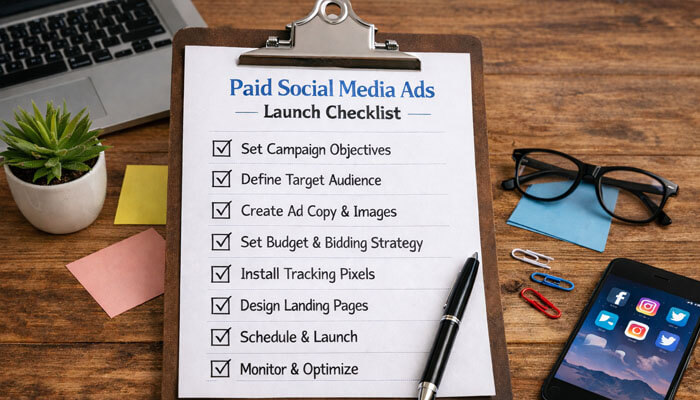
Before launching, confirm that you have:
- chosen one clear objective
- installed tracking correctly
- added UTMs where needed
- selected the right audience
- excluded existing buyers or leads where relevant
- uploaded two or more creatives
- checked the CTA
- tested the landing page on mobile
- verified billing and account access
- reviewed policy compliance
Is Paid Social Media Advertising Worth It for Beginners?
Yes, paid social media advertising can be worth it for beginners when expectations are realistic. Ads are not magic. They amplify strategy.
If you have a clear offer, the right audience, strong tracking, platform-fit creative, and a good landing page, paid social can accelerate awareness, leads, and sales.
If those pieces are missing, budget can disappear quickly. That is why the best way to learn how to run paid social media ads is to start with a small, structured campaign, measure what matters, and improve systematically.
Final Thoughts
Learning how to run paid social media ads is less about hacks and more about fundamentals. Start with one clear objective, choose the right platform, set up tracking properly, build creative that fits the platform, use focused targeting, respect ad policies, and optimize based on real business outcomes.
Start with one platform, one campaign goal, and one clear offer. That simple approach makes it easier to learn what works and improve results over time.
Frequently Asked Questions (FAQs)
1. What is the best platform for beginners to run paid social media ads?
For many beginners, Meta is the easiest place to start because it offers broad reach, flexible objectives, and many placements. LinkedIn is often better for B2B, while TikTok is strong for short-form creative and awareness-focused campaigns.
2. How much should a beginner spend on paid social media ads?
There is no perfect number for every business. Start with a budget large enough to test a few audiences and creatives without spreading spend too thin. The goal is to gather enough data to spot patterns.
3. What is the most important part of running paid social media ads?
The most important part is matching the campaign objective to the real business goal. After that, tracking, audience quality, creative relevance, and landing page performance matter most.
4. Are lead form ads better than sending traffic to a website?
Not always. Lead form ads usually reduce friction and increase lead volume, while website forms often allow better qualification and stronger post-click messaging. Testing both is often the best option.
5. Why do ad results and analytics reports sometimes look different?
Results can differ because of attribution windows, click and view-through reporting, CRM timing, and differences in how each system measures sessions and conversions. That is normal in paid social reporting.